Why your game's sound gets tiring: game audio mixing with volume tiers, ducking and three more tricks
Five game audio mixing tricks, side by side with live level meters: volume tiers with sliders, ducking, voice limits per sound, a high-frequency cut and a master limiter.
What we asked“Make a web page that demonstrates the audio mixing tricks that keep game sound clear and easy on the ears one at a time, so anyone can see and feel each one within a few seconds. For each one, show the same short moment side by side: without it on the left, with it on the right, playing in a loop, with a caption that says what just happened and a replay button. Where it helps, let me play the moment myself. It will sit inside a blog post about 720 pixels wide, so it has to look good at that width and on a phone. Also make each one viewable alone with ?trick=<id>&solo, using these ids: volume-tiers, ducking, voice-limit, high-cut, limiter. Generate every sound in code with the Web Audio API, start muted until the reader presses play, and show a live level meter under each side. Use the internet freely for better results: free CC0 art, fonts or small libraries (for example Kenney's CC0 assets) are welcome; download anything you use into this folder so the page works without outside links, and list each item with its licence and source in CREDITS.md.”
What happened
- Loaded the audio-mix skill
- Kenney's page blocked scripted downloads, so it used Atkinson Hyperlegible (SIL OFL) for the page text instead
- Wrote an audio engine where every sound is generated in code, each trick sits behind a switch, and the same loop can be rendered offline and measured
- Built the charts, live meters and readouts, plus Auto A/B, Without and With buttons and Try it yourself sounds
- Checked that the live readouts match the offline numbers (+8.5 vs +17.4 dB for ducking) and the coin counter stays at 4
- Checked 320, 375, 720 and 1200 px with no sideways scrolling and no errors
Every sound in your game is fine on its own, but after ten minutes of play the whole thing is tiring, and the warning that mattered got lost under the music. That’s a mix problem, not a sound problem. Our ears are most sensitive between about 2 and 5 kHz (Wikipedia), so piled-up bright sounds wear people out fast. Overwatch’s sound team aimed for players to “play by sound” with 12 players and their weapons all making noise at once (GDC Vault).
Each demo below plays the same 4-second moment on both sides, without the trick on the left and with it on the right. Sound is off until you press Play, and only one demo plays at a time. Auto A/B lets you hear one loop without, then one loop with; tap a side’s chart to listen to just that side. Under each side you see a level chart, a live meter with a CLIP light, and a “Measured” line from rendering the exact loop offline. Try it yourself buttons fire the sounds by hand. Every sound is generated in code.
1. Volume tiers
Rank every sound and give each rank its own volume. Key cues (danger, hits on the player, pickups) play loudest, actions sit about 6 dB lower, and music and ambience sit 12 to 18 dB lower. Route each group into its own bus, so you set one number per group instead of fixing sounds one by one. Overwatch reportedly uses an “importance system” that raises the sounds of your biggest threats “while dimming everything else” (PC Gamer). In our demo, the alert and pickup sit +9.8 dB over the music without tiers and +24.8 dB with them. The Music and Effects sliders only change the right side and are saved between visits. Give players separate sliders like these; the Game Accessibility Guidelines ask for separate controls for effects, speech and music (Game Accessibility Guidelines).
2. Ducking
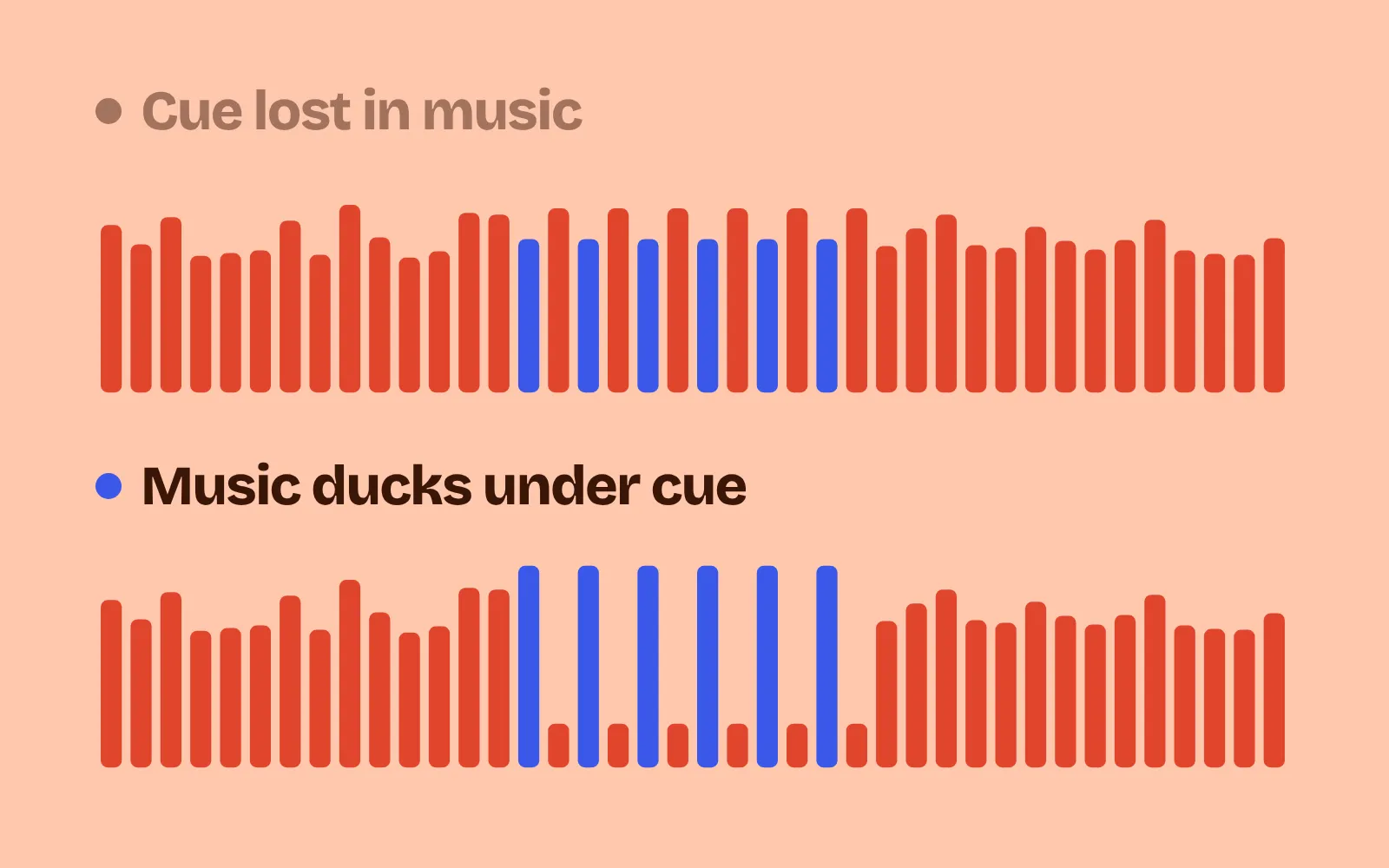
When a line of dialogue or a key cue plays, lower the music for a moment, then bring it back. Ducking means one signal turns down because another one is playing (Wikipedia). The music never stops, so it doesn’t feel like a glitch. In our demo the music drops 9 dB in about 50 ms and comes back over about 400 ms. The voice sits +8.4 dB over the music without ducking and +17.3 dB with it. Press Say a line and listen for the words on each side.
3. Voice limit
When many copies of the same sound start together (coins, shots, footsteps), they add up into one loud smear. Cap each sound at 3 to 4 copies at once, cut off the oldest copy to make room, and skip repeats that come within about 50 ms. Our demo also plays each new copy 2 dB quieter for each copy already playing. FMOD Studio has these as built-in settings: Max Instances, Stealing and Cooldown (FMOD manual). In our demo, a burst of coin pickups plays up to 12 copies at once on the left and never more than 4 on the right. Try Coin (tap fast!) or Coin burst ×18.
4. High-cut
Take a little off the top. Put a gentle high-shelf cut on the music (about −4 to −5 dB above 6 kHz), and soften the highs of bright sounds that repeat a lot, like shots and coins. In the browser this is a BiquadFilterNode set to highshelf or lowpass (MDN). Our demo uses −5 dB above 6 kHz plus a lowpass at 10 kHz on the music. The share of energy above 6 kHz falls from 34% to 12%. It sounds a little duller on a short listen; the gain is that it stays pleasant after ten minutes. Hold Hold to autofire to hear it.
5. Limiter
End the whole chain with a limiter, so a pile-up never goes past 0 dB and crackles. The browser’s DynamicsCompressorNode “can help prevent clipping and distortion when multiple sounds are combined” (MDN). Ours uses threshold −6 dB, ratio 20, attack 3 ms and release 250 ms. In our demo a boss goes down with explosions, an alert, a pickup and coins all at once. Without the limiter the peak reaches +4.6 dB with 932 clipped samples; with it, −3.7 dB and none. A single explosion on its own loses only about 1 dB. One thing to watch: browsers add hidden make-up gain to this node (about +3.4 dB with these settings), so our demo turns the level back down right after it.
Mix last, and measure
These tricks work together, and each can go too far. Duck too deep and the music pumps; cut too much and the game sounds muffled; limit too hard and loud moments lose their punch. The skill keeps every trick behind its own switch and checks the mix with numbers:
- Render one busy moment with the tricks on and off. An
OfflineAudioContextdoes this in the browser. - Clipped samples on the master should be zero.
- Key cue over music while the cue plays: our demo went from +9.8 to +24.8 dB.
- Most copies of one sound at once: 3 to 4.
- Energy above 6 kHz: lower with the tricks on.
- Then listen. Numbers catch clipping and pile-ups, but not taste. Play for ten minutes at a normal volume and see if you want to turn it down.
If you still need the sounds themselves, start with adding sound effects with an AI agent.
Add it to your game
- Copy the skill at the end of this page into your project.
- Ask your agent: “Make my game’s sound clearer and less tiring.”
- Play it, then tune in plain words: “The music still covers the warning sound.”
Font in the demos: Atkinson Hyperlegible by the Braille Institute of America (SIL Open Font License 1.1). All sounds are generated in code.
The skill that made it work
This is the whole skill we gave Claude Code. Copy it into your project and ask your agent to make your game's sound clearer. Every trick sits behind its own switch, and the last step renders a busy moment offline and measures clipping, pile-ups and how far key cues sit above the music.
- Find every sound and where it plays: key cues (danger, hits on the player, pickups, UI confirms), actions, ambience and music. Note which fire many times at once.
- Put every trick behind one named switch in a single settings object, all on by default, so each can be tested on its own.
- volume-tiers. Route sounds into buses (music, effects, cues, UI), each a gain node feeding the master. Key cues sit loudest, actions about 6 dB lower, ambience and music 12 to 18 dB lower. Give players separate Music and Effects sliders, saved between sessions.
- ducking. When a key cue or a line of dialogue plays, lower the music bus by about 6 to 10 dB over 50 ms and bring it back over 300 to 500 ms, so the cue cuts through without the music stopping.
- voice-limit. Cap each sound at 3 to 4 copies at once, stealing the oldest, and ignore retriggers within about 50 ms. Lower the gain of a sound a little for each copy already playing. FMOD calls these max instances, stealing and cooldown.
- high-cut. Put a gentle high-shelf cut (about -4 dB above 6 kHz) or a lowpass around 10 kHz on the music bus, and soften the brightest effects that repeat often (coins, footsteps, shots).
- limiter. End the chain with a compressor used as a limiter (Web Audio
DynamicsCompressorNode: threshold about -6 dB, ratio 20, attack 3 ms, release 250 ms), so pile-ups never clip. - Measure it. Render the same busy 10 s scripted moment with tricks on and off (an
OfflineAudioContextworks). Report peak level and clipped samples on the master (should be zero), most copies of one sound at once, how many dB the key cue sits above the music while it plays, and the share of energy above 6 kHz.
Save it as .claude/skills/audio-mix/SKILL.md in your project. Or connect your agent and type /aigamedev: it loads this skill with its reference files and the results from this post.