Does a skill make Claude Code's platformers feel better? We tested it
Same prompt, same model, one run with our platformer-feel skill and one without. We measured both jumps. The jump helpers came out the same; the skill made Claude test its game.
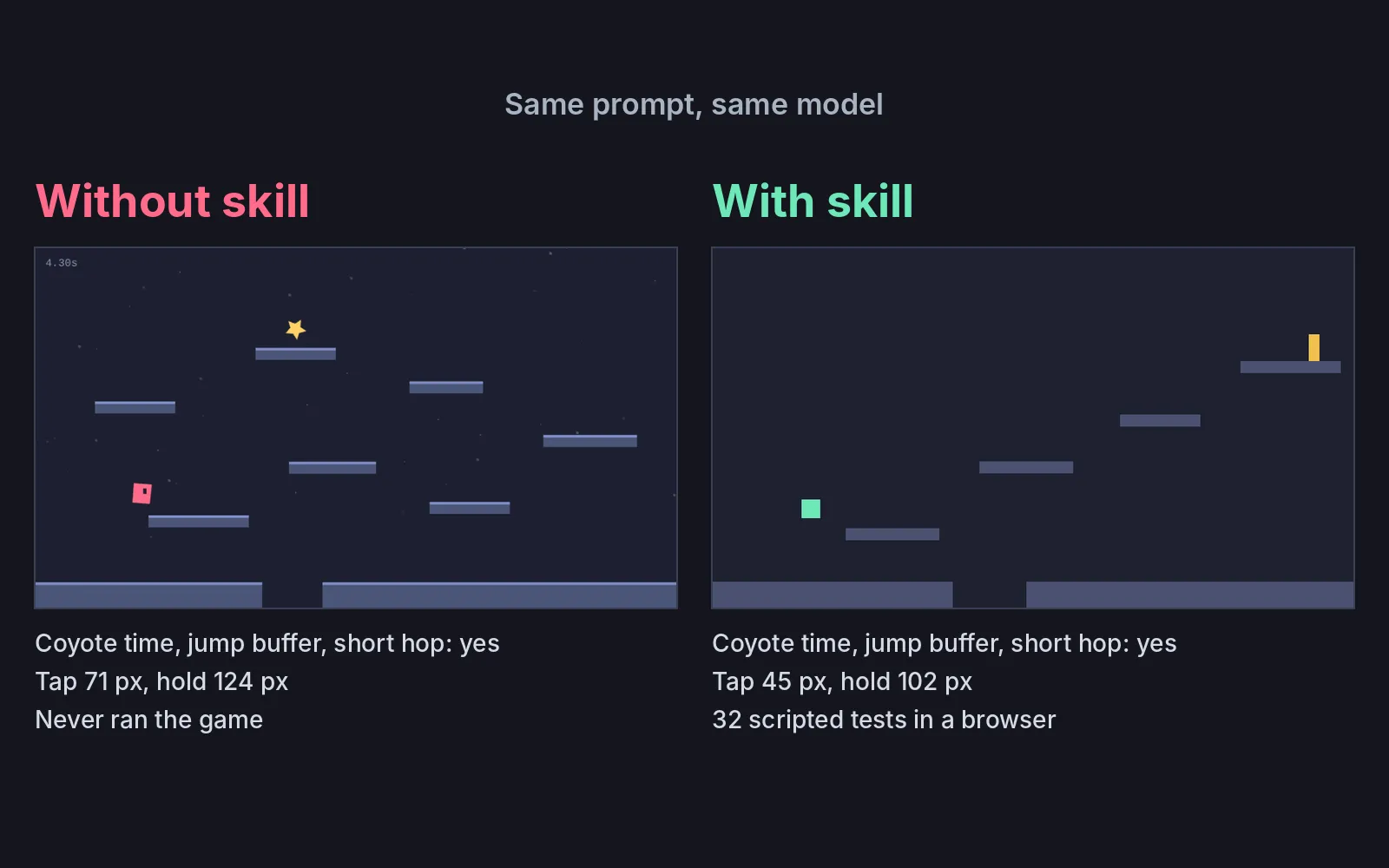
Verdict: Both games already had coyote time, jump buffering and a short hop, and all three worked in our tests. What the skill changed was testing, and the run cost almost four times as much.
What we asked“Make a small platformer that runs in the browser with Phaser: a player square that runs and jumps between a few platforms, with one page I can open. Make the jump feel good to control.”
We wrote a skill called platformer-feel for this site. It tells Claude Code to add three jump helpers and to prove each one works with scripted key presses. Does it make a better game than the same request without it? We ran the test once each way.
The rules we kept to:
- Same prompt, word for word, sent once with no follow-ups. Same Claude Code version and model.
- Both sessions ran in an empty folder with a clean Claude Code: no personal skills, plugins or MCP servers. The only difference was the skill folder in one of them.
- We measured both games with one test script of our own. It doesn’t use anything the games expose for testing.
Play both
Without the skill. Arrow keys or A/D to run, Space, Up or W to jump, hold for a higher jump, R to restart. Reach the star.
With the skill. Same controls. Reach the yellow flag.
For this site we only added the start screen, loaded Phaser from here instead of the internet, and made the second game scale to fit the frame. The games are otherwise exactly what Claude wrote.
Results
Our script runs each game at a steady 60 frames per second and presses real keys. For coyote time it runs the square off a ledge and presses jump 0.05 s after the last frame on the ground. For the jump buffer it drops the square and taps jump 0.08 s before it lands. As a check the other way, it also presses 0.20 s after the ledge and 0.30 s before landing, where neither game should jump. Each test ran three times and gave the same answer every time.
| Without skill | With skill | |
|---|---|---|
| Coyote time | Jumps | Jumps |
| Jump buffer | Jumps | Jumps |
| Too late, too early | No jump | No jump |
| Tap vs hold | 71 vs 124 px | 45 vs 102 px |
| Console errors | None | None |
| Tested its game | No | Yes, 32 checks |
| Time | 1.5 min | About 9 min |
| Cost | $0.28 | $1.07 |
To check that our script can catch a missing helper, we turned the helpers off in copies of both games. The coyote and buffer tests then failed in both, and tap and hold reached the same height, so the tests measure what they claim to.
Without the skill, Claude added coyote time (0.10 s) and jump buffering (0.12 s) anyway, with the same numbers the skill suggests. It added more than the skill asks for: heavier gravity on the way down, a short hang at the top of the jump, squash and stretch, dust puffs, a timer and a goal star. It looked for a browser, didn’t find one, and only checked the code for syntax errors. Its last message said the jump heights and gaps were “worked out on paper”. It only searched for a Chrome or Chromium program. Playwright and its browser were installed on the machine, and it never tried them.
With the skill, Claude read the skill’s notes, wrote the game and then 32 scripted checks, which it ran in a hidden browser at 30, 60 and 144 fps. The tests found two real bugs, and it fixed both: a very quick tap could fall between two frames and be ignored, and at 30 fps the square sometimes lost its “on the ground” state. It also looked at a screenshot, saw that one ledge couldn’t be reached, and removed it. Its game looks plainer, with no effects at all.
The tap heights differ too. The skill aims for a tap at 35 to 50% of a full jump. The game with the skill hops 44% of its full jump, the one without hops 57%.
What this means if you’re starting out
If you ask for a jump that feels good, Claude Code already knows the usual tricks and adds them without a skill. Both games got the same three helpers, so the skill’s effect showed up in the checking. Without it, you are the tester, and Claude is trusting maths it never ran. With it, you pay more and wait longer, and in our run you got measured numbers and two bugs fixed before anyone played.
One trap for beginners: in the game made without the skill, setting coyote time or the jump buffer to exactly 0 stops the square from jumping at all, because every jump checks both timers. To turn them off there, we had to use 0.0001. The game made with the skill still jumps normally with all three helpers turned off.
This is one run of each, so another run could come out differently.
Was this useful?
Thanks, we read every message.