Why good 2D cameras don't just follow the player: 5 tricks from 30 years of side-scrollers
A camera glued to the player shakes, hides what's ahead and makes jumps feel seasick. Watch five classic camera tricks side by side, with and without, then add them to your game.
What we asked“Make a web page that demonstrates the 2D camera techniques one at a time, so anyone can see and feel each one within a few seconds. For each one, show the same short moment side by side: without it on the left, with it on the right, playing in a loop, with a caption that says what just happened and a replay button. Where it helps, let me play the moment myself. It will sit inside a blog post about 720 pixels wide, so it has to look good at that width and on a phone. Also make each one viewable alone with ?trick=<id>&solo, using these ids: camera-window, smoothing, look-ahead, platform-snap, cue-focus.”
What happened
- Loaded the camera-feel skill
- Wrote the camera as its own small module, so every scripted moment could be tested without a browser
- Wrote a check that runs each moment and confirms what its caption claims, plus the all-on against all-off measurement
- Built both views on one page, sharing the same player input
- Found that the player didn't move in "Play it yourself" and fixed it
- Remembered jump presses for a moment so quick taps on a phone aren't lost
- Stopped the camera from pulling the player to the very edge of the screen
A camera glued to the player sounds right, but it twitches with every step, shakes on every jump and shows as much of what’s behind you as what’s ahead. Good 2D games almost never do that. Itay Keren collected the tricks they use in a long article, Scroll Back (2015), with examples from decades of side-scrollers. Here are five of them. Each demo plays the same moment twice: without the trick on the left, with it on the right. Press Play it yourself to run and jump; both sides copy your moves.
1. Camera window
The player can move freely inside a box in the middle of the screen. The camera only moves when they push against its edge, so small steps back and forth don’t shake the whole world. Keren lists Sonic the Hedgehog, Shinobi and Streets of Rage among the games that use it.
2. Smoothing
Instead of jumping to where it wants to be, the camera covers a fraction of the remaining distance every frame, so it glides. Keren names Donkey Kong Country as one of the first games to do this, and Super Meat Boy as a modern example.
3. Look-ahead
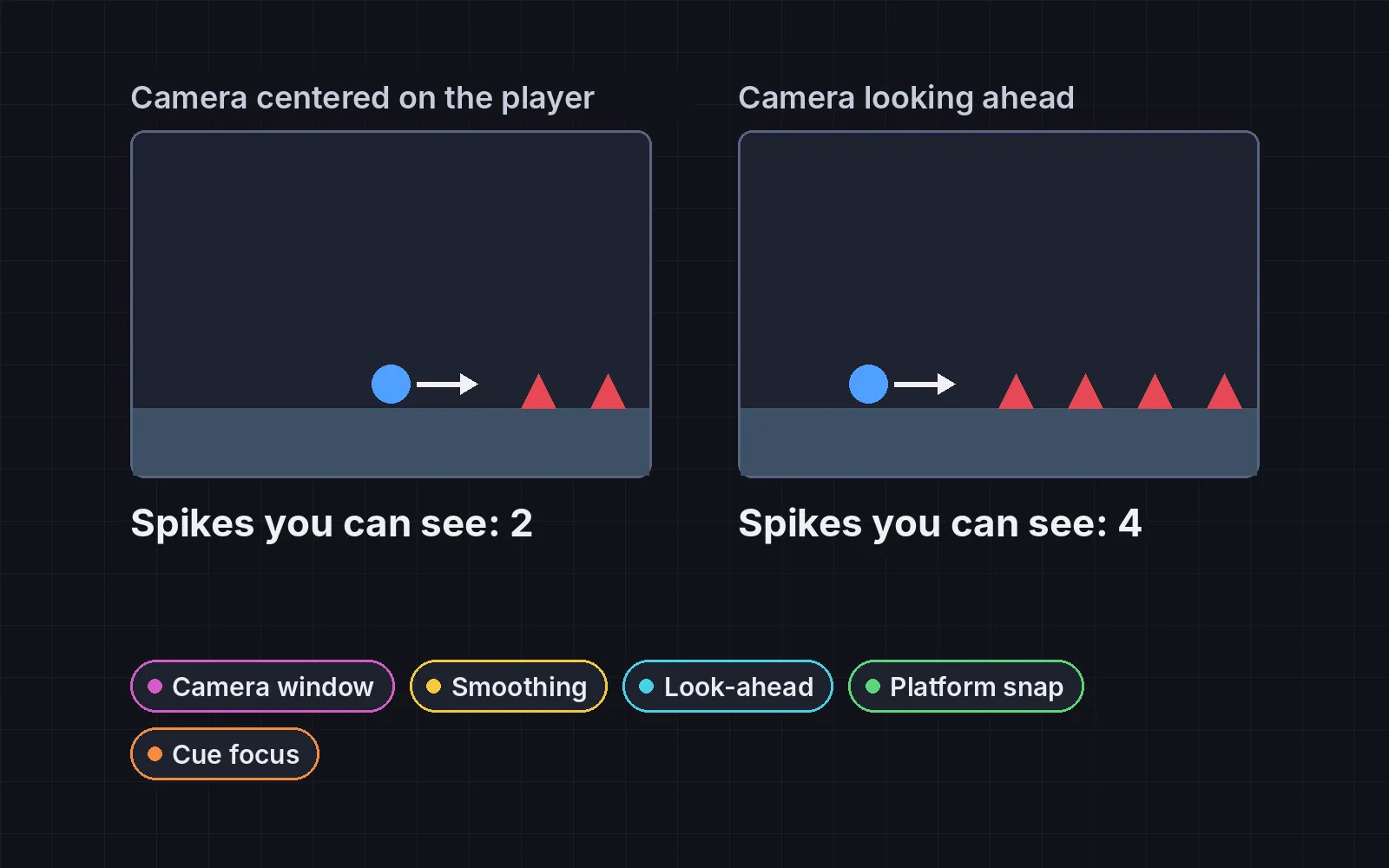
The camera shifts toward where the player is heading, so they see more of what’s coming. Defender kept a point about a quarter of the screen ahead of the ship. The trick is to wait a moment before switching sides, so turning around quickly doesn’t swing the view.
4. Platform snapping
The camera ignores the up and down of a jump and only moves when the player lands on a new height, or falls. Super Mario World does this, so its jumps don’t jolt the view.
5. Cue focus
Points of interest, like a key or an enemy, pull the camera partway toward them when the player comes near, so they show up on screen. Keren points to Limbo and Insanely Twisted Shadow Planet.
Does it actually help?
Claude Code measured the same five routes with every technique on and every technique off:
| Camera jerkiness | View ahead on a straight run | |
|---|---|---|
| All on | 0.068 px/frame² | 177 px |
| All off | 0.140 px/frame² | 165 px |
The camera is about half as jerky. The view ahead only grows on straight runs; on routes full of turning back and forth, look-ahead’s short wait before switching sides costs a little view, which is the price of a camera that doesn’t swing.
Add it to your game
- Copy the skill at the end of this page into your project.
- Ask your agent: “Improve my game’s camera.” It works for platformers and any 2D game that scrolls.
- Play it, then tune in plain words: “Look further ahead.” “The camera is too slow to catch up.”
Two rules worth keeping:
- Never hide danger. Whatever the camera does, the player must see what can hurt them in the direction they’re moving.
- Follow falls at once. All of these tricks can wait, except a fall: if the player drops below the screen, catch up immediately.
The skill that made it work
This is the whole skill we gave Claude Code. Copy it into your project and ask your agent to improve your camera. The last step makes it measure the result instead of guessing.
- Find the camera code: where the camera position is set each frame, and the level bounds. Note the screen size and the player's speed.
- Pick the techniques this game needs, and put each behind one named switch in a single settings object, so it can be tested on its own. Not every game needs all five:
- camera-window. Let the player move freely inside a box in the middle of the screen (about a quarter of the width and a third of the height). The camera moves only when the player pushes against the edge of the box.
- smoothing. Never jump the camera to its target. Each frame move it a fraction of the remaining distance, frame-rate independent:
pos += (target - pos) * (1 - exp(-k * dt)), with k around 6 to 10. - look-ahead. Shift the camera toward the direction the player is moving, about 20 to 25% of the screen width, so they see more of what is coming. Only switch sides after the player has moved the new way for a short moment (about 0.3 s or a few tiles), so quick turns don't swing the camera back and forth.
- platform-snap. Don't follow the player's height while they jump. When they land on a new height, ease the camera to it. If they fall below the screen, follow at once.
- cue-focus. Give points of interest (a boss, the exit, a key) a pull radius. When the player is inside it, move the camera partway toward the point so it is in view.
- Clamp the camera to the level bounds, and never let a technique hide a hazard in the direction the player is moving.
- The camera must feel still. When the player stands still, the camera stops within half a second and stays put: no drifting toward points of interest, no look-ahead creeping back. Techniques must not fight each other: apply look-ahead on top of the window's result, and never let two pulls move the camera in opposite directions in the same second.
- Show it to the user: record a short clip (or a strip of screenshots) of the camera on the busiest stretch, and ask them to watch it once. A camera that measures well can still feel strange.
- Measure it. Run a scripted player through the same route with the techniques on and off. Report the average view ahead of the player in the direction of motion, the camera's jerkiness (average change in camera speed per frame), the share of time the player was within 15% of a screen edge, how far the camera moves while the player stands still for 2 s (should be about 0), and how often the camera reverses direction per minute while the player keeps moving one way (should be about 0). With the techniques on, the view ahead should be larger, the camera smoother, the player rarely near an edge, and the camera still when the player is.
Save it as .claude/skills/camera-feel/SKILL.md in your project. Or connect your agent and type /aigamedev: it loads this skill with its reference files and the results from this post.