"I never saw that coming": telegraphed attacks in games, with wind-ups, danger zones and three more tricks
Five ways to make enemy attacks readable: wind-up poses, a danger flash, ground markers, audio cues and a recovery window, each shown side by side with a skill you can copy.
What we asked“Make a web page that demonstrates the five telegraph tricks that make enemy attacks readable one at a time, so anyone can see and feel each one within a few seconds. For each one, show the same short moment side by side: without it on the left, with it on the right, playing in a loop, with a caption that says what just happened and a replay button. Where it helps, let me play the moment myself. It will sit inside a blog post about 720 pixels wide, so it has to look good at that width and on a phone. Also make each one viewable alone with ?trick=<id>&solo, using these ids: windup, flash-tell, danger-zone, audio-cue, recovery. On the left the same enemy attack plays without that one tell, on the right let me try to dodge it, and keep sound off until I tap a sound button. Use the internet freely for better results: free CC0 art, fonts or small libraries (for example Kenney's CC0 assets) are welcome; download anything you use into this folder so the page works without outside links, and list each item with its licence and source in CREDITS.md.”
What happened
- Loaded the telegraphs skill
- Downloaded three free Kenney packs and picked an ogre, a wizard, a viking and a hero, plus a bell and impact sounds
- Wrote one shared simulation, used by both the page and a headless bot test
- Made the wait before each attack random, so you can't dodge the left side by counting the rhythm
- Let you tap either side to take it over from the bot, and kept sound off until you press Sound
- Checked taps, dodging, the counter-hit and sound on a phone-sized touch screen, where the two sides stack
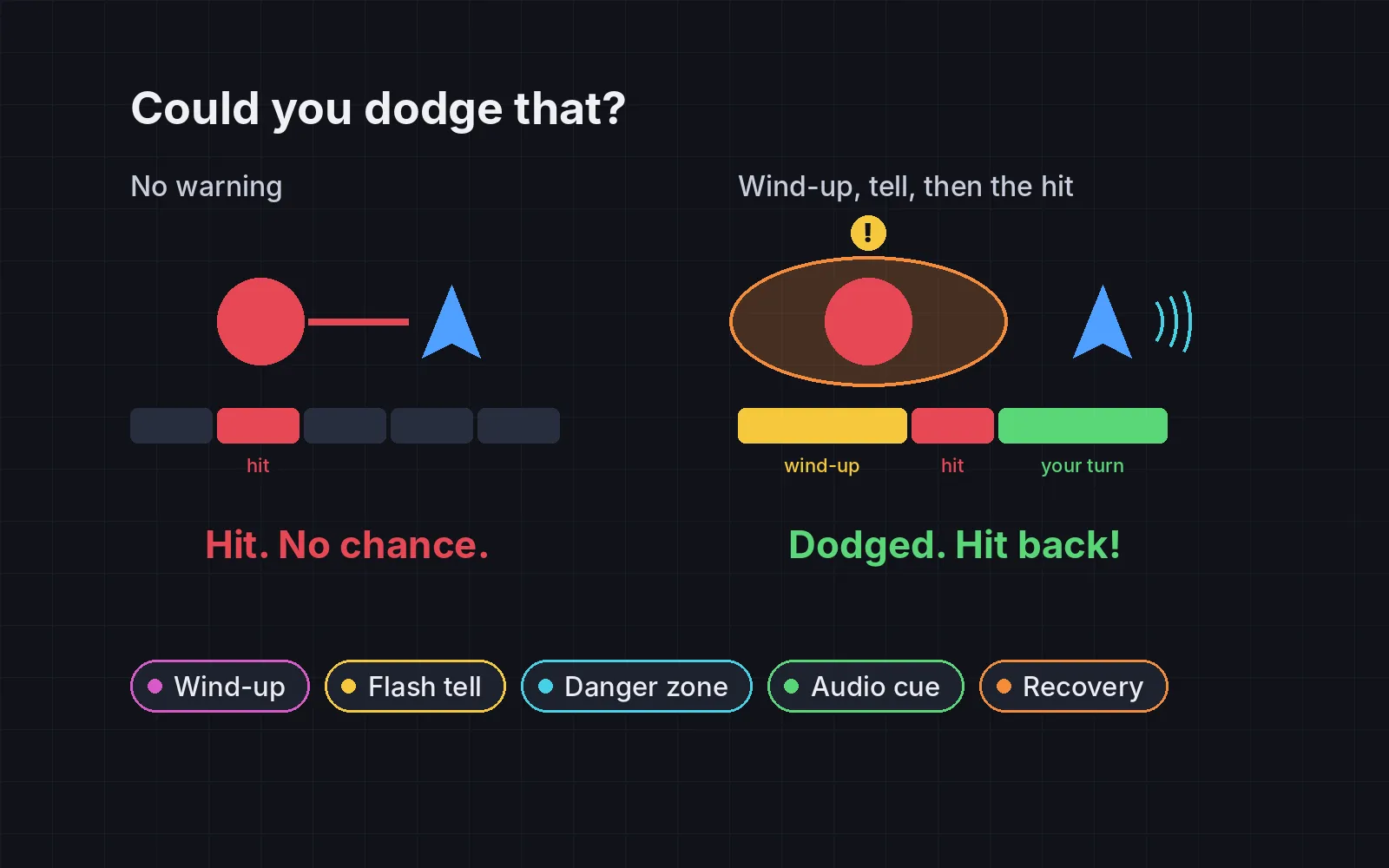
You get hit, and you have no idea what happened. The enemy stood still, then the damage was just there. Players call that cheap, and they’re right: an attack you can’t read is a coin flip, not a challenge. The fix is a telegraph, a tell before the attack that says when it will land, where, and what to do. Subset Games made telegraphed enemy attacks a core mechanic of Into the Breach, and Justin Ma said that when every attack is telegraphed, “the game starts to feel like a puzzle” (Game Developer).
In each demo below, the same attack lands at the same moment on both sides. The left side has no tell and a bot plays it. The right side is yours: tap or click where to stand, or use the arrow keys. The wait before each attack is random, so you can’t win by counting. Let the bot play hands it back, and Sound stays off until you press it.
1. Wind-up
Before the hit, the enemy holds a clear pose: pulls back, crouches, leans away. It is the oldest tell there is, and it costs one animation. Mike Stout gives the “long wind-up” before a sword swing as the common example (Game Developer). How long? Combat designer Mike Birkhead puts the sweet spot for big attacks at about 1 to 1.5 s; past about 2 s, players start counting instead of reacting (Game Developer). Light attacks need less, about 0.3 to 0.6 s. Here the ogre lifts its axe for 1 s. On the left it stands still, then swings.
2. Flash tell
When the wind-up starts, flash the enemy, or an icon above it, in one colour you keep only for “danger”. Sekiro flashes a red kanji meaning “danger” over the player’s head before its perilous attacks, according to the fan wiki (Fextralife). If some attacks need a different answer, like block instead of dodge, give those their own colour. To show the flash on its own, this ogre doesn’t pose at all: the right side gets only a red pulse and a ”!” sign.
3. Danger zone
For area attacks, the question isn’t only when but where. During the wind-up, draw the exact area that will be hit on the ground, and let it fill up as the hit gets close. In Final Fantasy XIV, area attacks are “often indicated by bright orange highlights on the ground” (FFXIV wiki). The one rule you can’t break: the damage must match the marker exactly. Here the wizard’s fire covers half the room, so you also have to pick the right way out.
4. Audio cue
Players can’t see everything, but they can hear it. Give each dangerous attack its own short sound when the wind-up starts. In Overwatch, each hero shouts a line when using their ultimate, and hearing McCree’s “It’s high noon” means find cover (Blizzard Watch). In our demo a spearman stabs in from off screen. On the right, a bell rings 1 s before, from the side the spear will come from, so headphones help. Turn on Sound for this one: the right side shows “SOUND OFF” until you do. In our bot test, hits from off screen dropped from 100 to 0.
5. Recovery
A telegraph tells players when to dodge. A recovery window gives them a reason to dodge well. After the attack, leave the enemy stuck off-balance for about 0.5 to 1 s, so a good dodge earns a hit back. Double Fine reportedly built Psychonauts 2’s boss attacks as telegraph, attack, recovery (Game Developer). Both sides here keep the wind-up, so you can dodge either way. On the left, the viking has its shield back up in 0.1 s. On the right, it staggers for 0.8 s with stars over its head: step away, then tap the viking (or press Space) to hit back. Counter-hits in our bot test went from 0 to 100.
How long is too long?
A tell can be too generous. If every attack winds up for 2 s, players stop reacting and start counting, and the fight goes flat. Some rules of thumb:
- Scale the tell with the danger. Short for light jabs, about 1 to 1.5 s for heavy hits, and never past about 2 s.
- Keep the danger colour for danger. If harmless things flash red too, the flash stops meaning anything.
- Make the hit match the tell. Damage that lands outside the marker, or a beat after the sound, breaks trust faster than no tell at all.
Bosses use all five of these, plus a few rules of their own: see boss battle design.
Add it to your game
- Copy the skill at the end of this page into your project.
- Ask your agent: “Make my enemies’ attacks readable.”
- Play it, then tune in plain words: “The ogre’s wind-up is too long, I’m counting instead of reacting.”
Art and sound in the demos: Tiny Dungeon, Kenney Fonts and Impact Sounds by Kenney (CC0).
The skill that made it work
This is the whole skill we gave Claude Code. Copy it into your project and ask your agent to make your enemies' attacks readable. Every tell sits behind its own switch, and the last step makes a bot count dodges with each one off and on.
- Find every enemy attack: when the enemy decides to attack, when damage turns on, and the area it covers.
- Put every trick behind one named switch in a single settings object, all on by default, so each can be tested on its own.
- windup. Before each attack, hold a clear pose (pull back, crouch, lean away): about 0.3 to 0.6 s for light attacks, 1 to 1.5 s for heavy ones. A combat designer writing on Game Developer puts the sweet spot at 1 to 1.5 s; past about 2 s players start counting instead of reacting.
- flash-tell. When the wind-up starts, flash the enemy or an icon above it in one reserved colour that means "danger"; use another colour for attacks that need a different answer (dodge vs block). Sekiro flashes a red "danger" kanji before perilous attacks.
- danger-zone. During the wind-up, draw the exact area that will be hit on the ground, filling up as the hit approaches; the damage must match the marker exactly. Final Fantasy XIV marks most area attacks as bright orange shapes on the ground.
- audio-cue. Give each dangerous attack its own short sound when the wind-up starts, so the player can react to enemies off screen. In Overwatch each hero shouts when using an ultimate; hearing "It's high noon" means take cover.
- recovery. After the attack, leave the enemy stuck for about 0.5 to 1 s in an off-balance pose, so a good dodge earns a chance to hit back. Double Fine built Psychonauts 2's boss attacks as telegraph, attack, recovery.
- Measure it. Run 100 scripted attacks, tricks on and off, against a bot that dodges 0.25 s after it can detect the attack (pose, flash, marker or sound). Report the share dodged, hits from off-screen enemies and counter-hits landed during recovery. Dodges and counter-hits should rise; off-screen hits should fall.
Save it as .claude/skills/telegraphs/SKILL.md in your project. Or connect your agent and type /aigamedev: it loads this skill with its reference files and the results from this post.