Why your game runs faster on a 144 Hz screen: delta time and fixed timestep
The same jump at 30 and 144 fps, with and without delta time, a fixed timestep, interpolation, a capped frame time and frame-rate-independent smoothing. Watch them side by side.
What we asked“Make a web page that demonstrates the frame-rate independence techniques one at a time, so anyone can see and feel each one within a few seconds. For each one, show the same short moment side by side: without it on the left, with it on the right, playing in a loop, with a caption that says what just happened and a replay button. Where it helps, let me play the moment myself. It will sit inside a blog post about 720 pixels wide, so it has to look good at that width and on a phone. Also make each one viewable alone with ?trick=<id>&solo, using these ids: delta-time, fixed-timestep, interpolation, clamp-dt, smooth-lerp. Make the frame-rate difference visible, for example by running the same moment at 30 fps and 144 fps and showing the numbers.”
What happened
- Loaded the frame-rate skill
- Built each lane as its own small game running at its own simulated rate, so a 144 fps lane really updates 144 times a second on any screen
- Wrote a headless test that runs every scripted moment and prints the numbers
- Put the ledge between the 30 fps and 60 fps jump heights, so the jump without a fixed timestep can't make it however well you time it
- Added a slider for the physics rate and a Cause a hitch button
- Checked at 375 px, in dark mode and in solo mode
Screens run at 30, 60, 120, 144 or 240 frames per second. If your game moves things by a fixed amount each frame, it runs at a different speed on every one of them. This isn’t a beginner-only bug: in the 2018 Fallout 76 beta, players who unlocked the frame rate could run faster, because the game’s physics were tied to it (PCGamesN). Each demo below runs the same moment at 30 fps and at 144 fps, without the technique on the left and with it on the right. The frame rates are simulated, so the numbers are the same whatever your screen is.
1. Delta time
Multiply every change by the time since the last frame (dt), so speeds are in pixels per second, not pixels per frame. Without it, the race takes 2.33 s at 30 fps and 0.49 s at 144 fps. With it, both take 1.17 s.
2. Fixed timestep
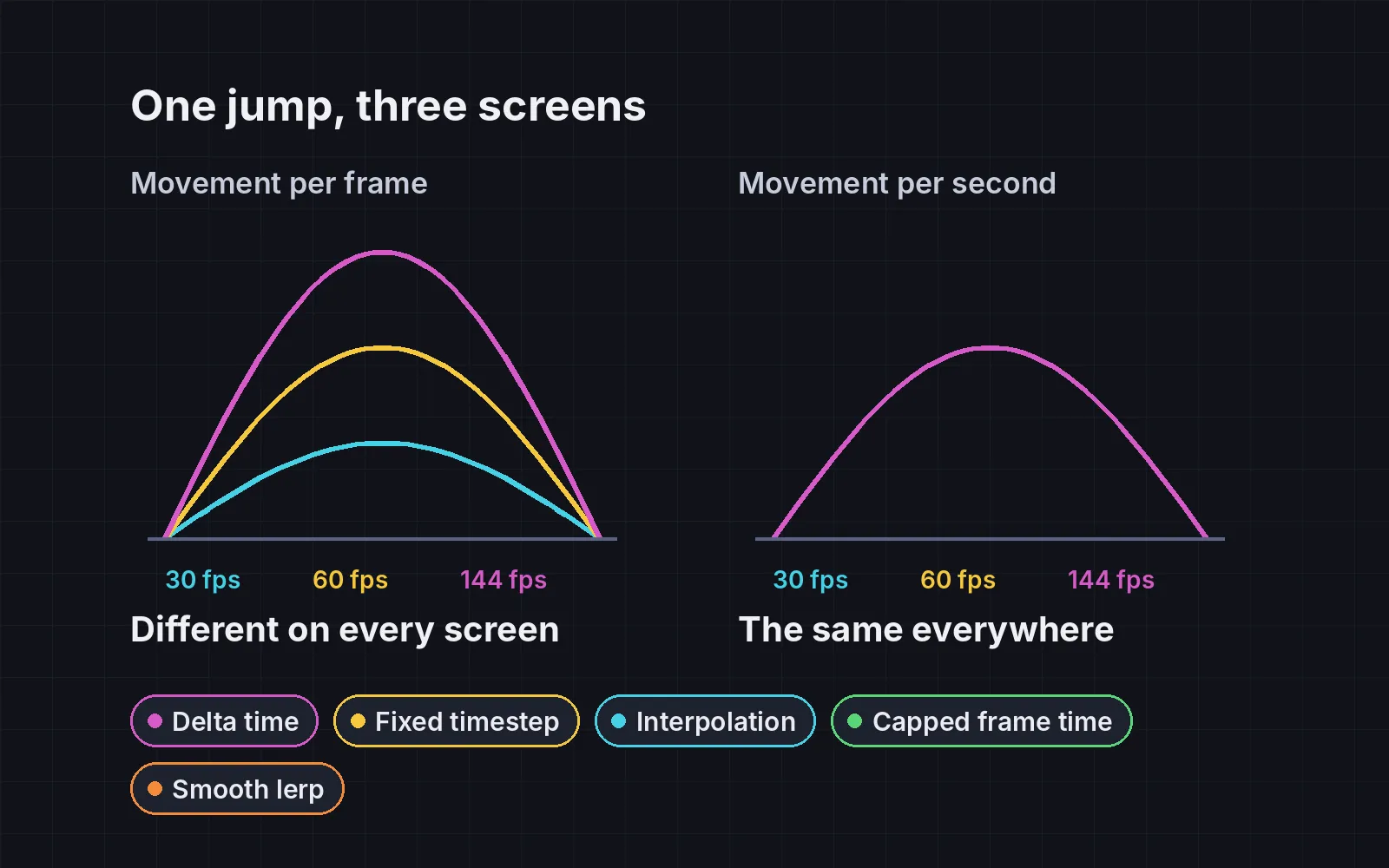
Delta time alone still isn’t enough for physics: bigger steps cut corners, so a jump at 30 fps peaks lower than at 144 fps. Here that’s 72.0 px versus 78.3 px, and the 30 fps runner can’t clear a 73 px ledge however well you time it. The fix is to run physics in fixed steps, say 1/60 s, using an accumulator. Glenn Fiedler’s “Fix Your Timestep!” is the classic explanation. Both jumps then peak at 76.0 px. Try it: jump yourself.
3. Interpolation
A fixed timestep brings its own problem: when the screen draws more often than physics steps, some frames show the same position twice, and motion stutters. Drawing objects between their last two physics positions fixes it. Here, with physics deliberately slowed to 20 steps a second so you can see it, the ball stands still in 86% of frames at 144 fps without interpolation, and in 1% with it. The slider changes the physics rate.
4. Cap the frame time
When the game hitches for half a second (a loading spike, a breakpoint, a background tab), the next frame’s dt is huge, and things teleport. Here a ball jumps 108 px straight through a wall. Capping dt at about 0.1 s means it moves 22 px and bounces. In a fixed-timestep loop the cap also prevents the “spiral of death”, where the game can never catch up. Press Cause a hitch.
5. Smoothing that doesn’t depend on frame rate
The most common hidden frame-rate bug is this line, used for cameras and followers: x += (target - x) * 0.1. It runs once per frame, so it’s twice as fast at 120 fps as at 60. Here, reaching 90% of the way takes 0.73 s at 30 fps and 0.15 s at 144 fps. The fix is x += (target - x) * (1 - exp(-k * dt)), as Scott Lembcke explains in “Improved Lerp Smoothing”. Both then take 0.37 s. Move your pointer or finger over the scene.
Which ones do you need?
- Every game: delta time, a capped frame time, and the smoothing fix.
- Games with jumps, physics or replays: a fixed timestep, plus interpolation so it stays smooth on fast screens.
- Using an engine? Unity, Godot and others already run physics on a fixed step. The bugs usually live in your own update code: movement, timers and that one lerp line.
Add it to your game
- Copy the skill at the end of this page into your project.
- Ask your agent: “Make my game behave the same at any frame rate.”
- Check its report: the same scripted run at 30, 60 and 144 fps should match within about 1%.
The skill that made it work
This is the whole skill we gave Claude Code. Copy it into your project and ask your agent to make your game behave the same at any frame rate. The last step makes it run the same input at 30, 60 and 144 fps and compare.
- Find the game loop and everything that changes per frame: movement, gravity, timers, animations, camera smoothing.
- Put every technique behind one named switch in a single settings object, all on by default, so each can be tested on its own.
- delta-time. Multiply every per-frame change by the time since the last frame (dt, in seconds): speed in pixels per second, timers in seconds. Gravity and acceleration too.
- fixed-timestep. Run physics and game rules in fixed steps (for example 1/60 s) using an accumulator: add each frame's time to it, and step the simulation while it holds at least one step. This makes jumps the same height at every frame rate and the game repeatable. Glenn Fiedler's "Fix Your Timestep!" (2004) is the classic description.
- interpolation. Draw objects between their last two simulated positions, using the leftover time in the accumulator as the blend amount, so movement stays smooth when frames and steps don't line up.
- clamp-dt. Cap the time handled in one frame (for example 0.1 to 0.25 s), so a hitch, a breakpoint or a background tab doesn't teleport things or start a "spiral of death" where the game can never catch up.
- smooth-lerp. Never write
x += (target - x) * 0.1per frame. Usex += (target - x) * (1 - exp(-k * dt)), which smooths the same at any frame rate. - Measure it. Run the same scripted input at 30, 60 and 144 fps with techniques on and off. Report jump height, time to cross the level and final positions. With the techniques on, they should match across frame rates within about 1%.
Save it as .claude/skills/frame-rate/SKILL.md in your project. Or connect your agent and type /aigamedev: it loads this skill with its reference files and the results from this post.