Why your enemies feel dumb: vision cones, alert states and three more enemy AI tricks
Five enemy AI tricks that make guards feel smart, shown side by side: vision cones, alert states, last known position, search patterns and barks. With a copyable Claude Code skill.
What we asked“Make a web page that demonstrates the enemy AI tricks that make enemies feel smart one at a time, so anyone can see and feel each one within a few seconds. For each one, show the same short moment side by side: without it on the left, with it on the right, playing in a loop, with a caption that says what just happened and a replay button. Where it helps, let me play the moment myself. It will sit inside a blog post about 720 pixels wide, so it has to look good at that width and on a phone. Also make each one viewable alone with ?trick=<id>&solo, using these ids: vision-cone, alert-states, last-known, search-pattern, barks. Use the same small top-down room with one guard and a sneaking player in every demo, and on the left side let the guard use a plain circle-of-sight, chase-the-real-position AI. Use the internet freely for better results: free CC0 art, fonts or small libraries (for example Kenney's CC0 assets) are welcome; download anything you use into this folder so the page works without outside links, and list each item with its licence and source in CREDITS.md.”
What happened
- Loaded the enemy-ai skill
- Downloaded Kenney's free Top-down Shooter sprites and the Kenney Future font
- Wrote one shared simulation and tuned each scripted moment with traces until both sides told a clear story
- Added Play it yourself: keys or tap-and-drag move the player in both rooms at once, and each room counts catches and escapes
- Kept the Kenney font for tags only, because its K looked like an H ("BARHS"), and fixed a sideways overflow on phones
- Wrote a measuring script that runs the 5 moments plus 400 random sneaks with the tricks off and on
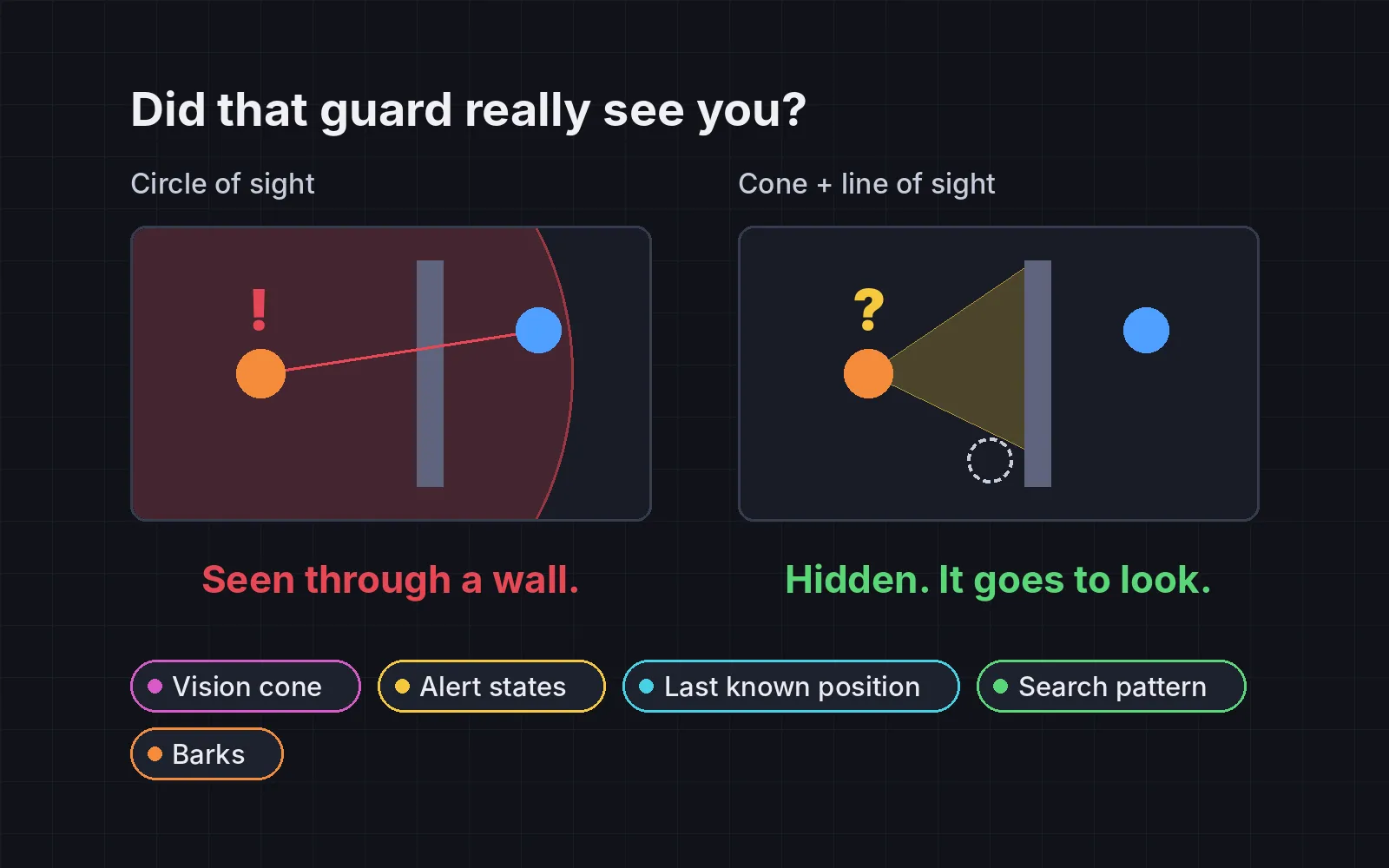
Your guard either sees you through a wall and charges at once, or loses you and runs straight to where you really are. Either way it feels like cheating, not like a smart enemy. Players judge an enemy’s brain only by what they see and hear. The developers of F.E.A.R. found that having soldiers say what they were doing made their teamwork look intentional, even when it was “just a side effect” (Jeff Orkin, GDC 2006).
Every demo below uses the same small room, one guard and a sneaking player. The left room always has the plain guard: it sees in a circle, through walls, and chases your real position. The right room adds the trick, on top of the earlier ones, because each one builds on the last. To see a trick alone, switch Left to All but this. Play it yourself gives you the player in both rooms at once: arrow keys or WASD, or tap and drag on a room.
1. Vision cone
Let the guard see in a cone, about 60 to 90 degrees wide with a fixed range, and block it with walls using a line-of-sight check. Draw the cone on the floor so the player can plan around it. In Mark of the Ninja, “the limits of the guard’s field of vision” are shown on screen, so players know what will happen before they commit (Game Developer). Our guard’s cone is 80 degrees. In our test runs (the five moments plus 400 random sneaks), the plain guard saw the player through a wall 166 times, almost a quarter of all its sightings. With the tricks on, 0.
2. Alert states
Use three states: calm, suspicious and alert. Suspicion fills while the player is in view (about 0.5 to 1.5 s to full, faster up close) and drains when they leave. Show it above the head: a ”?” while suspicious, a ”!” when alert. Metal Gear Solid uses exactly these two marks (Metal Gear Wiki). It gives the player a moment to react. In our runs, the time from first sight to first attack went from 0.93 s with the plain guard to 3.13 s with all tricks on (median).
3. Last known position
When the guard loses sight of you, it should go to where it last saw you, not to where you really are. Show a marker there. Splinter Cell: Conviction draws a silhouette at this “Last Known Position”, so the player can sneak around the guard while it looks there (Wikipedia). In our demo you get spotted, duck behind the short wall and double back. The plain guard follows you anyway; the smart one walks to the ghost marker, finds nothing and gives up.
4. Search pattern
From the last known position, check the nearby corners and hiding spots the guard couldn’t see, nearest first, ticking each one off. Give up after about 10 to 20 s, go back to patrol, and stay a little warier than before. The Last of Us’s hunters reportedly work like this: they share where they last saw you and “systematically explore the world to find you” (Game Developer). Our guard gives up after about 12 s. This loop is longer than the others; its first corner check comes about 3 s in.
5. Barks
Give the guard a short line on every change of state and before every attack: “Huh?”, “Over there!”, “Where’d you go?”. Say it about half a second before acting, and don’t repeat a line within a few seconds. This is the F.E.A.R. trick: “Having A.I. speak to each other allows us to cue the player in to the fact that the coordination is intentional” (Jeff Orkin, GDC 2006). In our runs, 0% of the plain guard’s attacks came after a warning. With all tricks on, 100% came after a bark or a ”!”.
Smart, not unbeatable
The goal is a guard the player can read and outplay, not one that always wins. If it feels too hard, tune these before anything else:
- Suspicion fill time. Slower makes it more forgiving. Keep it over half a second even up close.
- Cone width and range. A narrower cone makes sneaking easier.
- Search time. Shorter means the guard gives up sooner.
And measure: the guard should see through walls 0 times, wait more than half a second between first sight and first attack, and warn before almost every attack.
Add it to your game
- Copy the skill at the end of this page into your project.
- Ask your agent: “Make the enemies in my game feel smarter.”
- Play it, then tune in plain words: “The guard notices me too fast up close.”
Art in the demos: Top-down Shooter and Kenney Fonts by Kenney (CC0).
The skill that made it work
This is the whole skill we gave Claude Code. Copy it into your project and ask your agent to make your enemies feel smarter. The last step counts sightings through walls and attacks without warning, with each trick off and on.
- Find every enemy brain: how it detects the player, which states it has, and what it does after losing the player.
- Put every trick behind one named switch in a single settings object, all on by default, so each can be tested on its own.
- vision-cone. Enemies see in a cone (about 60 to 90 degrees wide, fixed range) blocked by walls with a line-of-sight check, never a circle through walls. Draw the cone on the ground so the player can plan around it. Mark of the Ninja shows the limits of each guard's vision on screen.
- alert-states. Use three states: calm, suspicious, alert. Suspicion fills while the player is in view (about 0.5 to 1.5 s to full, faster when close) and drains when not. Show it above the head: a "?" while suspicious, a "!" when alert, as Metal Gear Solid does.
- last-known. When the enemy loses sight, store where it last saw the player and go there, not to where the player really is. Show a marker there. Splinter Cell: Conviction draws a silhouette at this Last Known Position.
- search-pattern. From the last known position, check the nearby corners and hiding spots it could not see, nearest first, marking each as searched. Give up after about 10 to 20 s and return to patrol, a little more suspicious than before.
- barks. A short line or speech bubble on every state change and before every attack: "Huh?", "Over there!", "Flanking left!", "Lost him." Say it about half a second before acting, and don't repeat a line within a few seconds.
- Measure it. Run scripted sneaks, tricks on and off. Report how often an enemy saw the player through a wall (should be 0), the time from first sight to first attack (should be over 0.5 s), and the share of attacks that came after a bark or a "!" (should be near 100%).
Save it as .claude/skills/enemy-ai/SKILL.md in your project. Or connect your agent and type /aigamedev: it loads this skill with its reference files and the results from this post.