What happened here? Environmental storytelling examples you can build
Let a room tell its story without words: objects that imply an event, before and after, framing that leads the eye, discoveries players make themselves and places that look lived in.
What we asked“Make a web page that demonstrates the environmental storytelling tricks that let a room tell its story without words one at a time, so anyone can see and feel each one within a few seconds. For each one, show the same short moment side by side: without it on the left, with it on the right, playing in a loop, with a caption that says what just happened and a replay button. Where it helps, let me play the moment myself. It will sit inside a blog post about 720 pixels wide, so it has to look good at that width and on a phone. Also make each one viewable alone with ?trick=<id>&solo, using these ids: implied-event, before-after, lead-the-eye, let-them-find, lived-in. Use the same small top-down room on both sides, with a character walking through it, so the only difference is the trick. Use the internet freely for better results: free CC0 art, fonts or small libraries (for example Kenney's CC0 assets) are welcome; download anything you use into this folder so the page works without outside links, and list each item with its licence and source in CREDITS.md.”
What happened
- Loaded the environmental-storytelling skill
- Downloaded Kenney's free Tiny Dungeon tiles, the Kenney Pixel font and a few RPG Audio sounds
- Drew both rooms with the same function from one settings object, so the trick's switch is the only difference between the sides
- Drew the furniture, meal, footprints, wear, dust, light and wanted poster in code to match Tiny Dungeon's colours
- Shrank the narrator's text, which overflowed its box
- Added Play it yourself and a Test your eye game, then checked everything at 720 px and on a 390 px phone
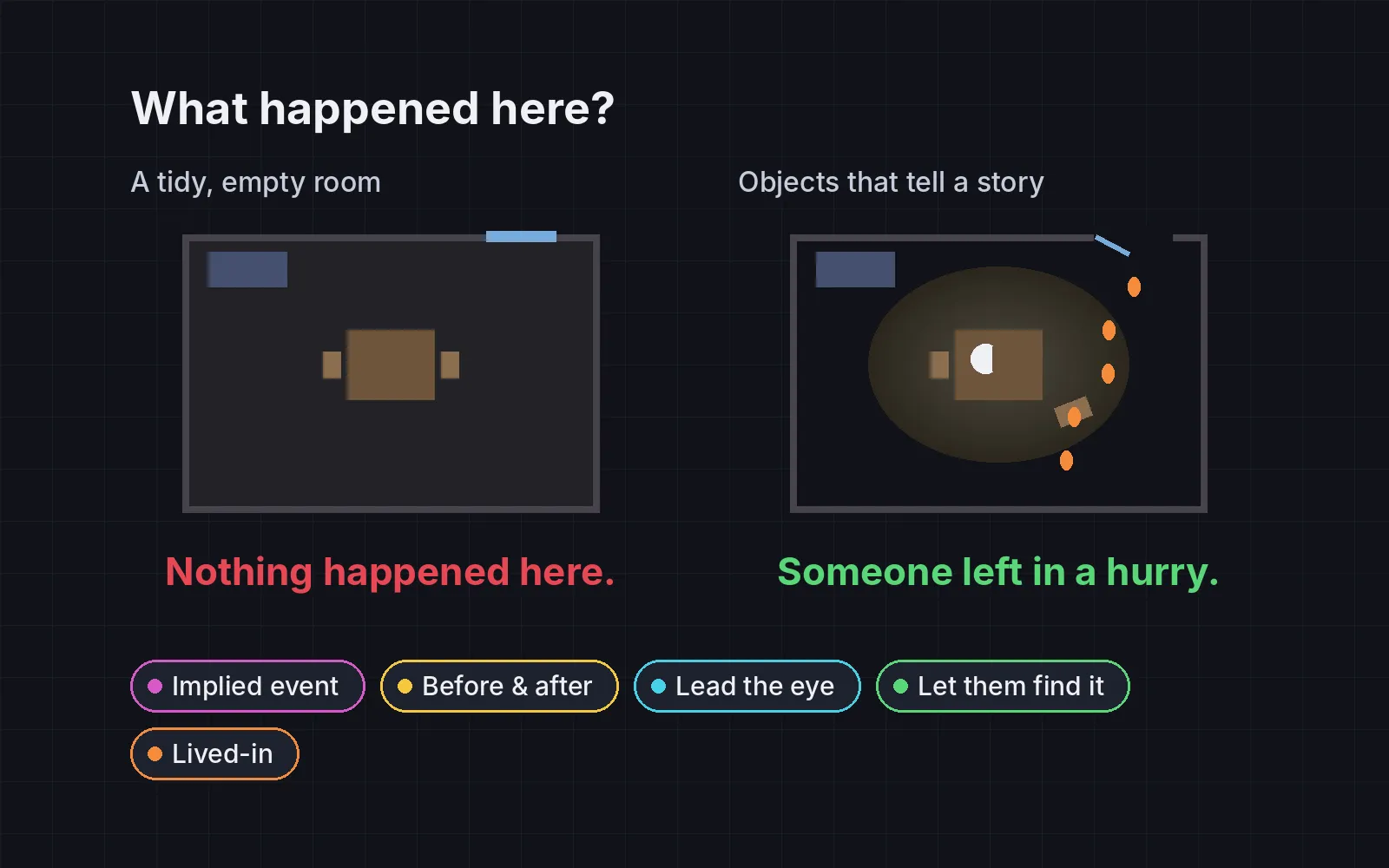
An empty room with a table, a bed and a chest says nothing. Knock the stool over, leave half a loaf on the table and a trail of muddy footprints to an open window, and the player starts asking “what happened here?” Harvey Smith and Matthias Worch gave a GDC 2010 talk with exactly that title, about spaces “that invite the player’s mind to piece together implied events” (GDC Vault). Each demo below shows the same small room with a character walking through it: the trick off on the left, on on the right. Play it yourself lets you walk both characters at once with the arrow keys, WASD or a tap.
1. Objects that imply an event
Stage two or three props whose arrangement only makes sense if something happened. On the left, supper is laid out and the window is shut. On the right, the stool lies on its side, the loaf is half-eaten, the mug has spilled, and muddy footprints lead to an open window with banging shutters. The test for each prop: does it help answer “what happened here?” If you can remove one and the story stays the same, it isn’t doing any work. Smith and Worch list props, lighting and scene composition as the usual tools for this (GDC Vault).
2. Before and after
Show the same place in two states, and let the change tell the story. The character visits the room, leaves, and comes back “later”. On the left, nothing has changed. On the right, the shelf has been pulled down, bottles are smashed, the chest is empty and the banner is torn. The wrecked room means more because you saw it tidy first. In play mode, walk out of the door and come back in.
3. Lead the eye
A story spot only works if the player looks at it. Make it brighter than its surroundings, frame it with a doorway or a path, and keep clutter away from it. On the left, a letter is lost in an evenly lit storeroom full of junk. On the right, the room is dimmer, a shaft of light from the window falls on the letter, a rug runs to it from the door, and the floor around it is clear. Valve wrote “Always see the button” in their notes on fixing a Portal level (Portal postmortem, PDF). Test your eye runs six timed rounds of “tap the letter” and averages your time with and without the trick.
4. Let them find it
Don’t narrate what the scene already shows. On the left, a narrator box explains everything: the wizard was at supper, the guards came, he fled through the window. On the right, there’s no text. If you go to the note on the floor, it turns out to be a wanted poster with the face from the portrait on the wall, and you put the rest together yourself. Working it out is the reward, and the narrator takes it away. Smith and Worch describe this as involving the player in pulling out information, instead of telling it to them (GDC Vault). In a GDC 2023 talk on the quests of Cyberpunk 2077 and The Witcher 3, Paweł Sasko reportedly gave similar advice: let players figure some things out from the world rather than from dialogue (Game Developer).
5. Make it lived-in
Places should agree with their history and with who lives there. On the left, the room is brand new and spotless, so it says nothing about its owner. On the right, there’s a worn track along the owner’s usual route, a dented doorstep, dust and cobwebs where nobody walks, a leak that has stained the wall and rusted a barrel, a pale patch where a picture used to hang, a mended stool and a burnt-down candle. Richard Rouse III argued at GDC 2010 that players spend more time exploring the world than watching scripted scenes, so the world itself should carry the story (GDC Vault).
Check that it reads
Environmental stories fail quietly. You know what happened, so you see it everywhere. A new player might not.
- Ask, don’t explain. Show the room to three to five people with no text, and ask “what happened here?” Count how many give the story you meant.
- Time the first look. If it takes long before they look at the story spot, lead the eye harder.
- Hunt for contradictions. One shiny new crate in an old ruin breaks the history. Every prop should agree with the story.
- Don’t overload it. Two or three clear clues beat ten. Too many props turn a story into clutter.
Add it to your game
- Copy the skill at the end of this page into your project.
- Ask your agent: “Make this room tell what happened here, without text.”
- Play it, then tune in plain words: “Nobody notices the footprints.”
Art in the demos: Tiny Dungeon, Kenney Fonts and RPG Audio by Kenney (CC0).
The skill that made it work
This is the whole skill we gave Claude Code. Copy it into your project and ask your agent to let your rooms tell their own story. The last step makes it check the story with real people instead of trusting the designer's eye.
- List the story beats a level should carry, and the spots where the player passes, stops or looks.
- Put every trick behind one named switch in a single settings object, all on by default, so each can be tested on its own.
- implied-event. Stage two or three objects whose arrangement only makes sense if something happened: a chair knocked over, a half-eaten meal, a trail of footprints to an open window. Each prop should answer "what happened here?"
- before-after. Show the same place in two states: the tidy shop the player saw earlier, now with smashed shelves; the bridge they crossed, now down. The change is the story.
- lead-the-eye. Put the story spot where the player will look: light it brighter than its surroundings, frame it with a doorway or path, keep clutter away from it. Portal's team made sure players could always see the button they needed.
- let-them-find. Don't narrate what the scene shows. Remove the caption or voice line that explains it; let a note, a sound or one optional look at a detail confirm it instead. The player's own conclusion is the reward.
- lived-in. Make places agree with their history: wear on doorsteps, faded posters, rust where water drips, belongings that match who lives there. Nothing should contradict the story (a shiny new crate in a ruin).
- Measure it. Show the scene to three to five people with no text and ask "what happened here?". Count how many give the intended story. Also time how long until they look at the story spot, and list any prop that contradicts the history (should be none).
Save it as .claude/skills/environmental-storytelling/SKILL.md in your project. Or connect your agent and type /aigamedev: it loads this skill with its reference files and the results from this post.