An adaptive soundtrack in code: one theme, eight tracks, no DAW
One prompt and a skill gave our platformer eight chiptune tracks written as notes in code, all on one theme, that follow the player from room to room. Hear them, then play.
Before you start
- The chapter with Wick's first animation pass from part 13: 53 rooms in five sections, in a single-page Phaser game with juice, 17 sound effects, pixel art, tests and a route for every room. It had no music.
- Claude Code, started in the game's folder, plus Node and Playwright for the tests and the measurement, and ffmpeg for the MP3 previews.
- The skill at the end of this page, in the folder's .claude/skills/game-music/. Then give the prompt below to a fresh session.
What we asked“The game has sound effects but no music. Write an original soundtrack for it in code: calm music for the rest spots, music for exploring each section, rising tension for the storm chase and a release at sunrise, all sharing one theme. It should follow what the player is doing, sit under the sound effects, and have its own mute. Don't change how anything plays.”
What happened
- Loaded the game-music skill
- Read the skill's references, the game's sound code and its tests
- Read how rooms, rest spots, the chase and the end screen work
- Listed every room of the five sections with its kind and beat
- Read the sequencer that comes with the skill
- Copied the sequencer into the game and wrote the song: eight tracks, their layers and the states the game asks for
- Rendered every track and balanced the instruments
- Started a render of every state change in a row, in the background
- Added the music scripts, the N key and a Music button, the room-to-music mapping and the dips under big sounds
- Wrote 6 music tests
- Measured every room on a copy of the game without the music and compared
- Read the timeline result and looked at its picture
- Copied the MP3s and pictures into a music-renders folder in the game
- Sent four of the MP3s
- Ran the music tests four at a time to make the failures happen again
After one prompt, the platformer has a soundtrack: eight looping chiptune tracks, written as notes in a text file and played by a small sequencer in the browser. They all open with the same figure, D, a step up to E, a leap to A and back down, which the session called “the climb”. The music changes as you move through the chapter. Rest spots get a slow campfire tune, each section has its own, the storm chase speeds up, and sunrise brings the theme back slow and broad.
We wrote the music in code because it needs nothing installed, costs nothing and stays editable as text, and because the game can tell it what to do bar by bar. A generator like Suno gives you finished audio files, but its free plan is for personal use only and commercial use starts with Pro at about $10 a month (Sonilo). ACE-Step 1.5 is a free alternative that runs on your own machine under the MIT license (README). Both give you recordings, which you’d still have to cut into loops and layers by hand.
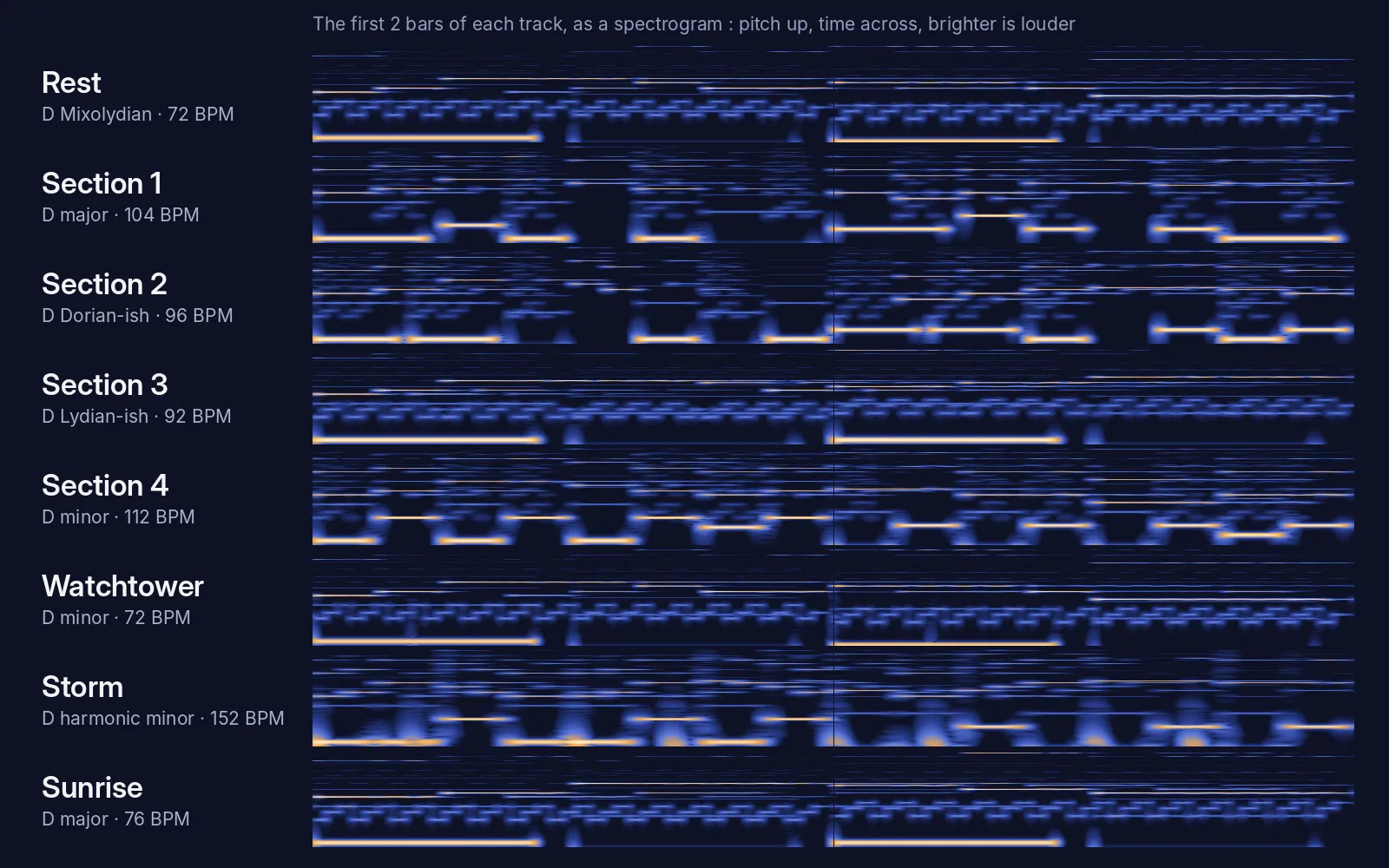
Everything here comes from the game's code. The reel and the tracks were rendered offline from music.js and song.js, and the live mode runs the same two files in your browser. Pick a track to see where the climb sits in its melody.
Eight tracks, one theme
| Track | Used for | Key | BPM | Loop |
|---|---|---|---|---|
| Rest | Rest spots in sections 1–4 | D Mixolydian | 72 | 26.7 s |
| Section 1 | First steps | D major | 104 | 18.5 s |
| Section 2 | Crumbling ground | D minor, near Dorian | 96 | 20.0 s |
| Section 3 | Refill orbs | D major, near Lydian | 92 | 20.9 s |
| Section 4 | All together | D minor | 112 | 17.1 s |
| Watchtower | The last section, before the storm | D minor | 72 | 26.7 s |
| Storm | The chase, three segments | D harmonic minor | 152, +7% in Storm 3 | 12.6 s |
| Sunrise | After the chase, and the end screen | D major | 76 | 25.3 s |
Every track is eight bars long and in D, so a crossfade from one to the next never changes key. The storm plays the climb twice as fast, and the sunrise stretches it over two bars. The Watchtower version adds a far-off heartbeat drum.
How it follows the game
- Calm rooms play bass and lead, ordinary rooms add chords, and test rooms and side rooms add drums. These are layers of one loop, so they fade in and out without a restart.
- Walking into a new place, like a rest spot, the next section or the Watchtower, switches the track on the next bar with a 1.5 s crossfade.
- The storm cuts in on the next beat. Storm 2 adds chords, and Storm 3 adds a high line and plays 7% faster.
- Sunrise comes in over 3 s while the storm fades out, and the bells join on the end screen.
- The music dips under the death sound, thunder, the rumble and the finish. A death never restarts it.
- Nothing plays until your first key press or click. N or the Music button turns the music off, and the game remembers that. M still mutes everything.
The music plays at 0.2 through the same master volume and limiter as the effects. Measured peak for peak, it sits 7–9 dB under the jump sound, and drops another 7–8 dB under a death.
Gameplay didn’t change: the difficulty measurement is identical with and without the music for all 53 rooms, and 35 of 35 tests pass.
What the session missed
Our own checks after the session found these:
- The layers are mixed so quietly that they hardly change the sound. Chords sit 17–20 dB under the rest of the track, so a section’s calm, ordinary and test versions differ by only 0.1 to 0.3 LU, and Storms 1 to 3 barely get louder. The tension in the storm comes from the high line and the speed-up. Compare the versions on the board above.
- Its own timeline check flagged Storm 3 as “NO CHANGE”. It decided that was expected and moved on.
- It compared the jump sound’s peak with the music’s average and reported a 17 dB gap. Peak for peak, the gap is 7–9 dB.
- The modes are looser than its table says. Section 2 uses both B and B♭, Section 3 both G and G♯, and Section 4 borrows a D major chord.
- The Watchtower is the last section’s rest spot, but it gets dark minor music instead of calm. That’s a design choice, and you may want the campfire there.
- It left 14 MB of MP3s and pictures in a music-renders folder inside the game, where they would ship with it.
- Section 1 and Section 4 loop every 18.5 and 17.1 seconds, so in a long room you hear the same loop many times.
We’ve since added rules to the skill: a layer must change the track audibly (about 2 LU, or a new instrument in a new register), levels get compared like for like, renders stay outside the game folder, a failed check gets fixed instead of explained away, and loops last at least about 20 seconds.
It took one prompt and no follow-ups: 48 minutes and $2.62 of Claude Code working alone.
Get the skill. The sequencer is plain JavaScript with no dependencies and works in any browser game, and the render script needs Node, Playwright and ffmpeg. You can also install all seven skills as a Claude Code plugin.
Click to start; N turns the music off, M mutes all sound. Arrow keys or A/D to move, Up, W or Space to jump. You need a keyboard. Wick here has the reworked animation from [part 13](/tutorials/character-animation/), made after this session. We only added the start screen and Phaser loaded from this site.
Recorded in the cloud with a clean Claude Code: no personal skills, plugins or MCP servers. The session had game-music and our other skills for this series installed: platformer-feel, platformer-levels, game-juice, game-sound, pixel-art and character-animation.
The skill that made it work
It gives Claude a tiny sequencer that plays chip music written as text, rules for one theme across every track and for music that follows the game's state, and a render script that measures what Claude can't hear.
- Decide the moods first: give each game state a mood, a key or mode and a tempo, keep it to three or four tracks plus layers, and use one short motif in every track.
- Write music as data: copy music.js into the game and put the song in its own file as note patterns, tracks, layers and states, played by chip instruments (pulse lead, triangle bass, noise drums, arpeggio chords).
- Make it follow the game: the same track fades layers in and out, another track switches on the next bar with a short crossfade, and death never restarts the loop. Every layer must change the sound clearly, by about 2 LU or with a new instrument in a new register.
- Mix it under the sound effects: through the game's master at around 0.2, dipped under big sounds, all tracks about equally loud, with its own remembered mute, and the main mute silencing everything.
- Respect the player: reuse the game's audio context, start on the first click or key press, and never change how the game plays.
- Check what you can't hear: render every track and a timeline of state changes, watch the sequencer in a scripted playthrough and confirm gameplay is unchanged. Compare levels like for like, keep renders outside the game folder, fix a change the checker can't see instead of explaining it away, and avoid loops shorter than about 20 s.
Save it as .claude/skills/game-music/SKILL.md in your project.
Was this useful?
Thanks, we read every message.