Why your hits feel weak: hitstop, screen shake and three more impact tricks
The same punch, with and without the five tricks action games use to make hits land: hitstop, screen shake, hit flash, knockback and squash. Watch them side by side, then add them to your game.
What we asked“Make a web page that demonstrates the impact tricks that make hits feel strong one at a time, so anyone can see and feel each one within a few seconds. For each one, show the same short moment side by side: without it on the left, with it on the right, playing in a loop, with a caption that says what just happened and a replay button. Where it helps, let me play the moment myself. It will sit inside a blog post about 720 pixels wide, so it has to look good at that width and on a phone. Also make each one viewable alone with ?trick=<id>&solo, using these ids: hitstop, screen-shake, hit-flash, knockback, squash-stretch.”
What happened
- Loaded the impact-feel skill
- Built one page with a jab and a heavy hit looping on two screens, the trick off on the left and on on the right
- Measured every freeze, shake and push by running the scripted punches in a headless browser
- Added a Slow motion button, because a 4-frame flash is hard to see at full speed
- Let you tap either screen to punch on both at once; two quick taps make the heavy hit
- Checked it at 720 pixels and at phone width with no errors
Your attack connects, the enemy’s health goes down, and nothing feels like it happened. That’s the most common complaint about early action games, and it’s rarely about damage numbers. It’s about the few frames around the hit. Below, the same jab and heavy hit play twice: plain on the left, with one trick on the right. Tap either screen to punch (two quick taps for the heavy hit), and use Slow motion to see what happens frame by frame.
1. Hitstop
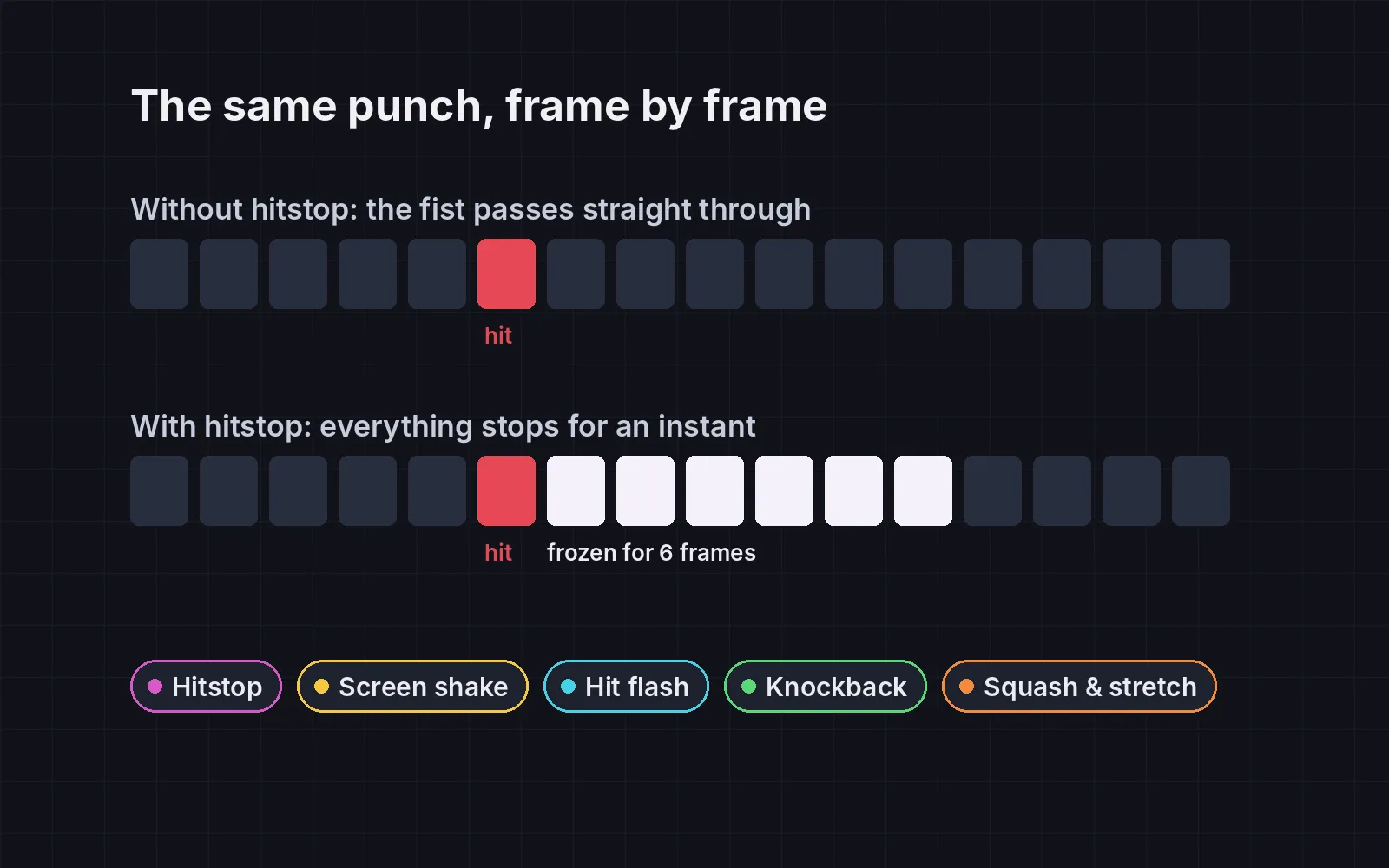
When a hit lands, the attacker and the target freeze for a few frames while the rest of the world keeps moving. Smash Bros. calls it hitlag: both fighters freeze, the length grows with damage, and from Brawl on it’s capped at 30 frames (SmashWiki). Masahiro Sakurai has spent whole episodes of his YouTube series on hitstop alone (GoNintendo). Here the jab freezes for 6 frames and the heavy hit for 12.
2. Screen shake
A quick shake on strong hits, along the direction of the hit, fading out fast. Vlambeer’s Jan Willem Nijman made the case for it in his 2013 talk “The Art of Screenshake”, where he turned a dull shooter into a punchy one with small tweaks like this (Game Developer). Keep it small for weak hits, and give players an option to turn it off.
3. Hit flash
Flash the target white for 2 to 4 frames. It costs nothing and tells the player exactly what they hit, which matters most in a crowd.
4. Knockback
Push the target away, more for bigger hits, and slow it down quickly so it doesn’t slide forever. Here the jab pushes about 12 px and the heavy hit about 37 px.
5. Squash and stretch
Squash the target along the hit and stretch it the other way for a few frames, keeping its area the same, then spring back. It’s one of Disney’s twelve principles of animation, and it makes a rigid sprite feel soft and hurt.
All five together
Each trick alone is subtle. Stacked, the left side looks like a prototype and the right side looks like a game.
Don’t overdo it
Every trick here has a cost if you push it too far. Long freezes make a fast game feel sticky, and constant shaking makes it hard to read and can make some players feel sick. The rules the skill follows:
- Freezes under a quarter of a second, even for the biggest hits.
- Shakes short and small, scaled with the hit, with a setting to turn them off.
- No shake while the player is dodging, so it never hides the thing they need to see.
Add it to your game
- Copy the skill at the end of this page into your project.
- Ask your agent: “Make the hits in my game feel stronger.”
- Play it, then tune in plain words: “The heavy hit freezes too long.”
The skill that made it work
This is the whole skill we gave Claude Code. Copy it into your project and ask your agent to make your hits feel stronger. Every trick sits behind its own switch, so you can compare each one with it off.
- Find where an attack connects: the moment damage is applied, and the attacker and target involved.
- Put every trick behind one named switch in a single settings object, all on by default, so each can be tested on its own.
- hitstop. When a hit lands, freeze the attacker and the target for a few frames (about 3 to 6 for light hits, 8 to 15 for heavy ones), while the rest of the game keeps running. Scale the freeze with damage. Smash Bros. does this and calls it hitlag.
- screen-shake. Shake the camera briefly on strong hits, in the direction of the hit, decaying quickly (about 0.1 to 0.25 s). Keep it small for weak hits and add an option to turn it off.
- hit-flash. Flash the target white (or a bright tint) for 2 to 4 frames on every hit, so the player can see what they hit even in a crowd.
- knockback. Push the target away from the attacker, scaled with damage, and slow it down quickly so it doesn't slide forever.
- squash-stretch. On impact, squash the target along the hit direction and stretch it the other way for a few frames, keeping its area the same, then spring back.
- Measure it. Run the same scripted fight with tricks on and off. Report how long each hit freezes, the largest camera offset, and how often the camera shook while the player was in the middle of a dodge. The game should still be readable: shakes short, freezes under about a quarter of a second, and no shake during dodges if possible.
Save it as .claude/skills/impact-feel/SKILL.md in your project. Or connect your agent and type /aigamedev: it loads this skill with its reference files and the results from this post.