"Where do I go now?": RPG quest design that players can follow
Five quest design tricks side by side: a reason given in the world, guidance without floating markers, a tracker line that says what to do, a real step, and an answer for every action.
What we asked“Make a web page that demonstrates the quest design tricks that make quests easy to follow one at a time, so anyone can see and feel each one within a few seconds. For each one, show the same short moment side by side: without it on the left, with it on the right, playing in a loop, with a caption that says what just happened and a replay button. Where it helps, let me play the moment myself. It will sit inside a blog post about 720 pixels wide, so it has to look good at that width and on a phone. Also make each one viewable alone with ?trick=<id>&solo, using these ids: reason, guidance, tracker-line, real-step, payoff. Use one small top-down village and one simple quest (a lost cat) for all five, so the only thing that changes between sides is the trick. Use the internet freely for better results: free CC0 art, fonts or small libraries (for example Kenney's CC0 assets) are welcome; download anything you use into this folder so the page works without outside links, and list each item with its licence and source in CREDITS.md.”
What happened
- Loaded the quest-design skill
- Downloaded Kenney's Tiny Town for the village, Tiny Dungeon for you and Mae, and two Kenney fonts
- Wrote the page, a small engine and the five scenes, then took screenshots
- Moved the Try button out of the scene, and raised Pip so she reads as carried
- Zoomed three demos in on the part of the village where the moment happens
- Set up proper phone checks and ran every playable side to the end with automated taps
You come back to a game after a week. The tracker says “The storm draws near…”, there’s a dot floating somewhere over the map, and you have no idea who asked you to do what, or why you should care. Most quest problems aren’t about the story. They’re about whether the player can follow it. The Witcher 3’s quest designers said they “declared war on ‘fetch quests’” (MCV/Develop), and the five tricks below are the ones that turn a fetch quest into something people remember.
All five demos use one small village and one quest: Mae’s cat Pip has run off in a thunderstorm. The left side has the trick off, the right side has it on, and nothing else differs. Where a side says Try it, press it to play that side yourself: tap or click to walk and tap things to use them, or use the arrow keys (or WASD) and Space. The other side keeps looping.
1. Give the reason in the world
Someone in the village says why, in their own words, at the moment the step starts. On the left, Mae says “Find my cat.” On the right, she explains as the thunder cracks: the thunder scared Pip, she hides in the orchard, please hurry before the rain. Same quest, but now you want to go. Paweł Sasko of CD Projekt Red put it this way in a GDC talk: “We want the players to want the story” (Game Developer). The rule: a tracker line alone is not a reason.
2. Let the world lead, not a floating marker
A floating marker shows where, but not how to get there, and it pulls the player’s eyes off the world. On the left, you walk straight at the dot, off the road and into the fence. On the right, muddy paw prints lead along the road, and a “mrrow” comes from a bush. Ghost of Tsushima uses a gust of wind instead of a marker; its creative director Jason Connell asked “how can we keep people immersed in this world instead of just more compasses and mini-maps on the screen” (Android Central). Fable II, as reported from GDC 2008, dropped the mini-map for a breadcrumb trail that leads you through the world (Engadget). A pin on a map is still fine for a step the player can do right now.
3. Write the tracker line as an order
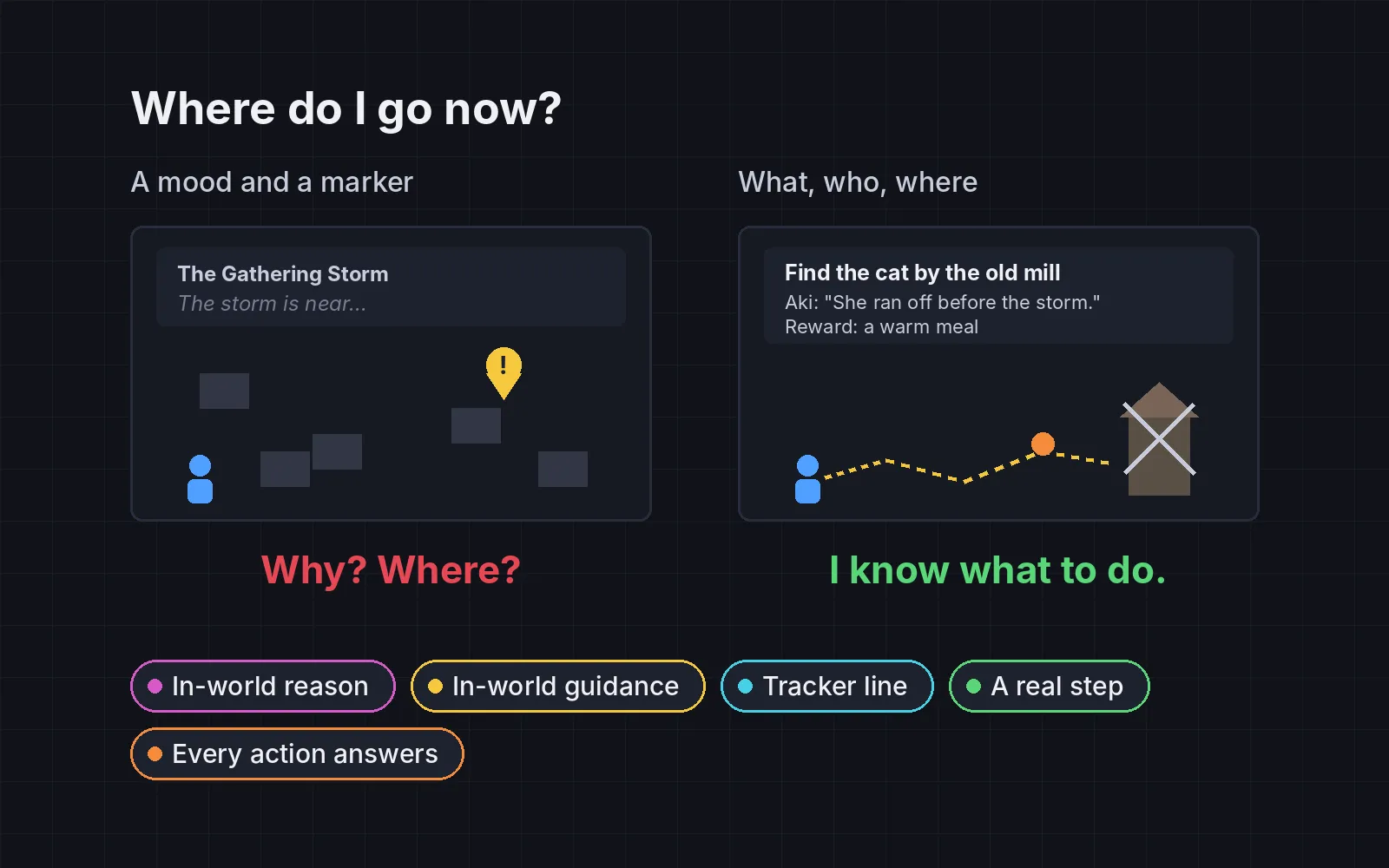
The tracker line is what players read when they come back after a break, and the Game Accessibility Guidelines note that a reminder of the current objective “can help greatly” (Game Accessibility Guidelines). Our rule for writing it: a verb, then who or what, then where, using a place the player already knows. “Find Pip in the orchard, east of the square.” Never a mood line. Under it, show who asked, why, and what it pays. On the left, with only “The storm draws near…” to go on, the player tries the woods, then the neighbour’s door. Try it: tap where you’d go.
4. Give it a step that isn’t walking up and talking
If every step is “walk there, press talk”, the quest is a list of errands. Give each quest at least one step where the player does something: search, chase, sneak, follow tracks, carry something without dropping it. Mateusz Tomaszkiewicz said the Witcher 3 team avoided “long, boring sequences without any action or gameplay in between” (MCV/Develop). On the left, Pip sits in the open: walk up, “Meow.”, done. On the right, you search the bushes, she bolts, and after a short chase you scoop her up in a corner.
5. Answer every interaction
When the player hands something over, something should happen that’s worth seeing. On the left, Pip vanishes, the tracker ticks, and Mae says nothing. On the right, Pip jumps into Mae’s arms, hearts pop up, Mae talks, and a berry pie flies over as the reward. Tomaszkiewicz again: bringing an item is fine if “the fact of bringing that item triggers an interesting conversation” (MCV/Develop).
Check every step
You can’t feel these problems in your own game, because you already know where everything is. So check them on paper. Make a table with one row per quest step and four columns:
- Reason given in the world? Yes or no.
- Does something in the world lead there? Yes or no.
- Does the tracker line start with a verb and name a place the player knows? Yes or no.
- What does the player get? A reaction, a reward, or nothing.
Quests made only of talking, and interactions with no answer, should both be zero. Then hand a tester only the tracker line: they should know where to go.
Not every step needs a chase. One real step per quest is enough, and a map pin is fine when the player can act right away. Teaching the controls before the first quest is its own topic: see tutorials without text.
Add it to your game
- Copy the skill at the end of this page into your project.
- Ask your agent: “Players don’t know where to go or why. Make my quests easy to follow.”
- Play it, then tune in plain words: “The paw prints are too faint, I lost the trail at the square.”
Art in the demos: Tiny Town, Tiny Dungeon and Kenney Fonts by Kenney (CC0). Pip, the pie and the hearts were drawn for the demo.
The skill that made it work
This is the whole skill we gave Claude Code. Copy it into your project and ask your agent to make your quests easy to follow. Every trick sits behind its own switch, and the last step audits every quest step in a table.
- List every quest step: what the player must do, who asked, where it happens, and what they get.
- Put every trick behind one named switch in a single settings object, all on by default, so each can be tested on its own.
- reason. A character gives the motive in the world at the moment the step starts, in their own words ("My cat ran off toward the mill, and the storm is coming"). A tracker line alone is not a reason.
- guidance. Something in the world leads there instead of a floating marker: a companion runs ahead and waits, the NPC can be heard, a lit path shows the way. Ghost of Tsushima uses a gust of wind to point the way. A pin on a map is fine for a step the player can do now.
- tracker-line. Write the current step in the player character's words, starting with a verb, then who or what, then where: "Find the cat by the old mill." Never a mood line ("The storm is near"). Under it, show who asked, why, and what it pays. A title may be poetic; this line may not.
- real-step. Give each quest at least one step that isn't walking up and talking: a search, a chase, a sneak, following tracks, carrying something without dropping it.
- payoff. Every interaction answers with something worth seeing: a knocked door opens to a person and a short exchange, a handed-over item gets a reaction and a reward. Never just a silent tick on the tracker.
- Measure it. Audit every step in a table: reason given in-world (yes/no), something in the world leads there (yes/no), tracker line starts with a verb and names a place the player knows (yes/no), and what the player gets. Quests with only talking and interactions with no response should be zero. Then give a tester only the tracker: they should know where to go.
Save it as .claude/skills/quest-design/SKILL.md in your project. Or connect your agent and type /aigamedev: it loads this skill with its reference files and the results from this post.