A pixel sushi bar in one prompt: customers, a chef and coins, Kairosoft style
One prompt and a skill gave us a tiny pixel-art sushi bar that runs itself: 30 different customers, a chef who slices and presses, moods you can read without words, and coins to spend. Part 1 of a sushi chain incremental. Play it.
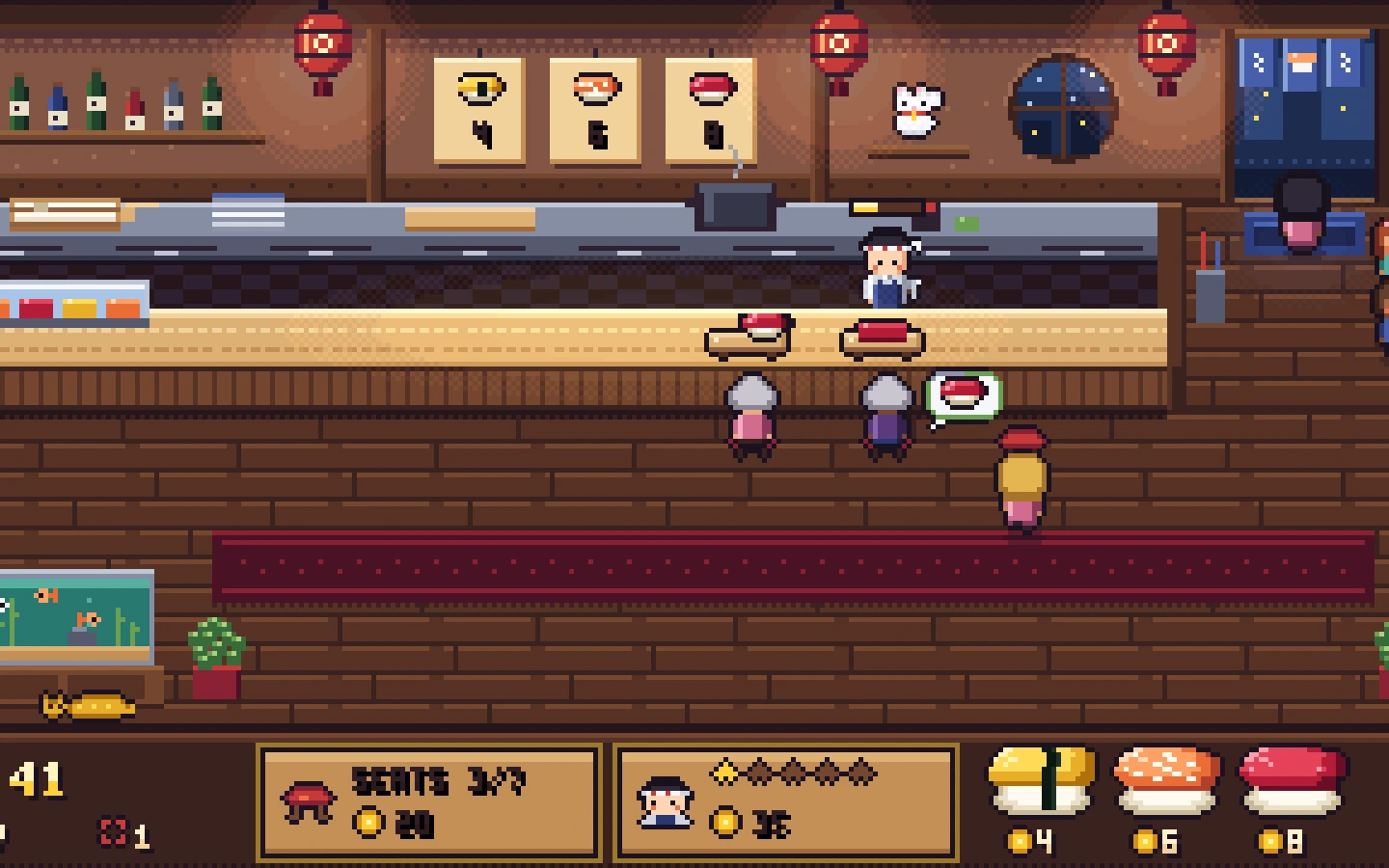
What we asked“Make a browser game called Neta: a pixel-art sushi bar seen from above. Customers walk in, sit at the counter, order, the chef makes their sushi, they eat, pay and leave, and the coins go up. Start with one small shop, one chef and three kinds of nigiri, and let me spend coins on more seats and a faster chef. Make it so charming that people would want to watch it.”
What happened
- Loaded the shop-sim skill and set up Vite, TypeScript and Phaser 3
- Drew every sprite as pixel rows in one Python file, then put them together into one picture of the whole shop before writing any game code
- Wrote the shop as plain TypeScript with a fixed step and a seeded random generator, so it runs without a browser
- Ran 10 simulated minutes and found it too easy: almost everyone was happy and a greedy player bought everything. Raised prices and lowered patience
- Took close-up screenshots at 4× of the chef working, eating, bubbles and coins, and fixed a bubble that covered the next plate
- Sent the first two customers in faster, because the first seconds looked empty
- Clicked both upgrade buttons in a real browser and measured 60 fps with every seat full
This is part 1 of a series where we build a full incremental game with Claude Code: a sushi restaurant chain where you earn money, open card packs to get ingredients, invent new sushi from them and open new restaurants. By the end it should be a game you could put on Steam. Before any of that, it needs one shop that people want to watch.
We wrote a skill from how Kairosoft games, Dave the Diver's sushi bar and Chef RPG make a small shop look alive, gave it to Claude Code with one prompt, and didn't touch anything after. This is what came out.
Play it
Customers come in on their own. Spend coins on more stools and a faster chef at the bottom. Click the game to turn on sound; the speaker icon turns it off. On a phone, turn it sideways. Open full screen
Everything you see is drawn in code: 320×180 pixels, scaled up by a whole number so the pixels stay sharp. There are 30 different customers from six types (a salaryman with a briefcase, a student with a backpack, a grandma with a cane who walks slower, a tourist with a camera, a kid and a young woman), a chef who walks to each customer, slices and presses rice, and three nigiri: tamago, salmon and tuna.
1. One picture of the whole shop first
If an agent makes a tile here and a sprite there, you get a mismatched, programmer-art look. The skill makes Claude draw one picture of the entire shop first, with the counter, the chef, customers in different states and food on plates, and fix that picture before writing the game. This is the first picture it made, and the shop it ended with:
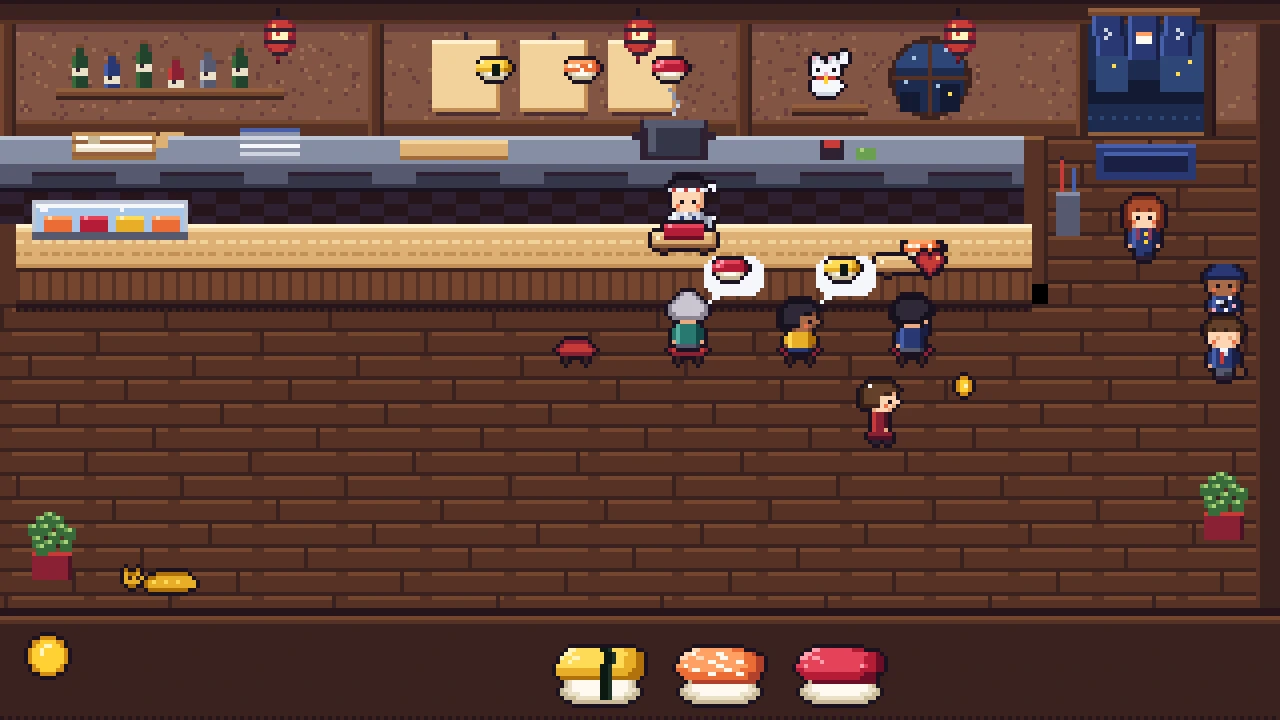
Claude's own verdict on its second try: "the room is warm, the food reads, and the outside is cool." The rules behind it are simple. The floor is the darkest thing, the counter is the brightest surface, people are brighter than furniture, and food is the most saturated thing on screen. Warm lantern light inside, cool blue street outside the door.
2. Tiny people built from parts
Kairosoft has made the same kind of tiny top-down pixel people for over a decade with a team of about six per game (App Store story). The trick is parts: one body, a few heads, hair styles and accessories, and colour swaps. Claude made 30 different customers this way, and the same customer looks the same every visit.
They feel alive because of small motion, not big motion: a blink, a foot tapping in the queue, chopsticks going up and down. Pixel artists call changing a few pixels' colours instead of moving the sprite sub-pixel animation; Metal Slug used it to make 34-pixel soldiers breathe (explainer).
3. Food is the hero
In a food game, the food has to look like you want to eat it. Pixel artist SLYNYRD's food guide says to outline food so it reads as an illustration and not a shrunken photo, and to build a dish layer by layer (Pixelblog 30). Capcom's Monster Hunter team exaggerates on purpose: glistening fat, steam, a little bounce (inkl). Here the tuna has a wet shine, the salmon has white fat lines, and each order is built on its board in front of you: fish block, one piece, then two.
4. Readable without words
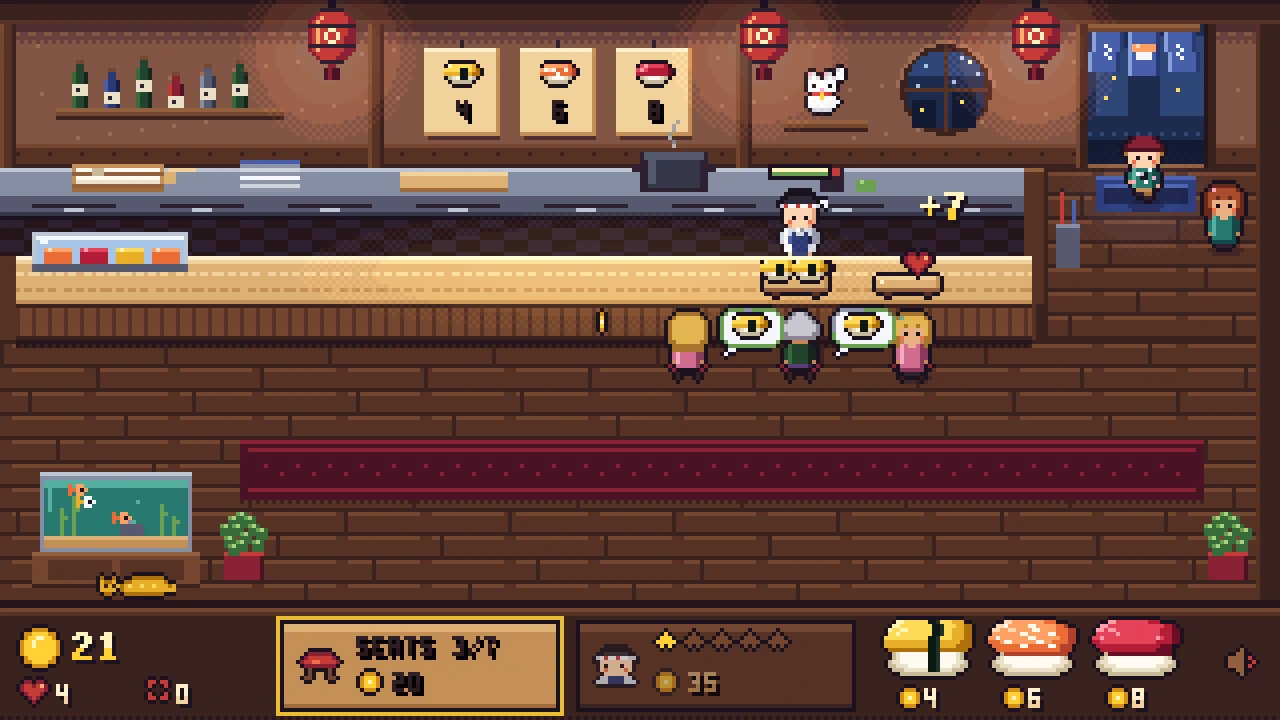
The Ramen Sensei is loved because customers "tell you plainly what they like" and criticised because its screens are hard to read at first (TouchArcade, GamesRadar). Dave the Diver gives each customer a patience meter; if it runs out they leave and the dish is wasted (NoobFeed). Our shop has no status text at all. The order bubble shows the dish, its border is the patience ring (green, then yellow, then red), a happy customer hops with a heart and a coin flies to the counter with +7:
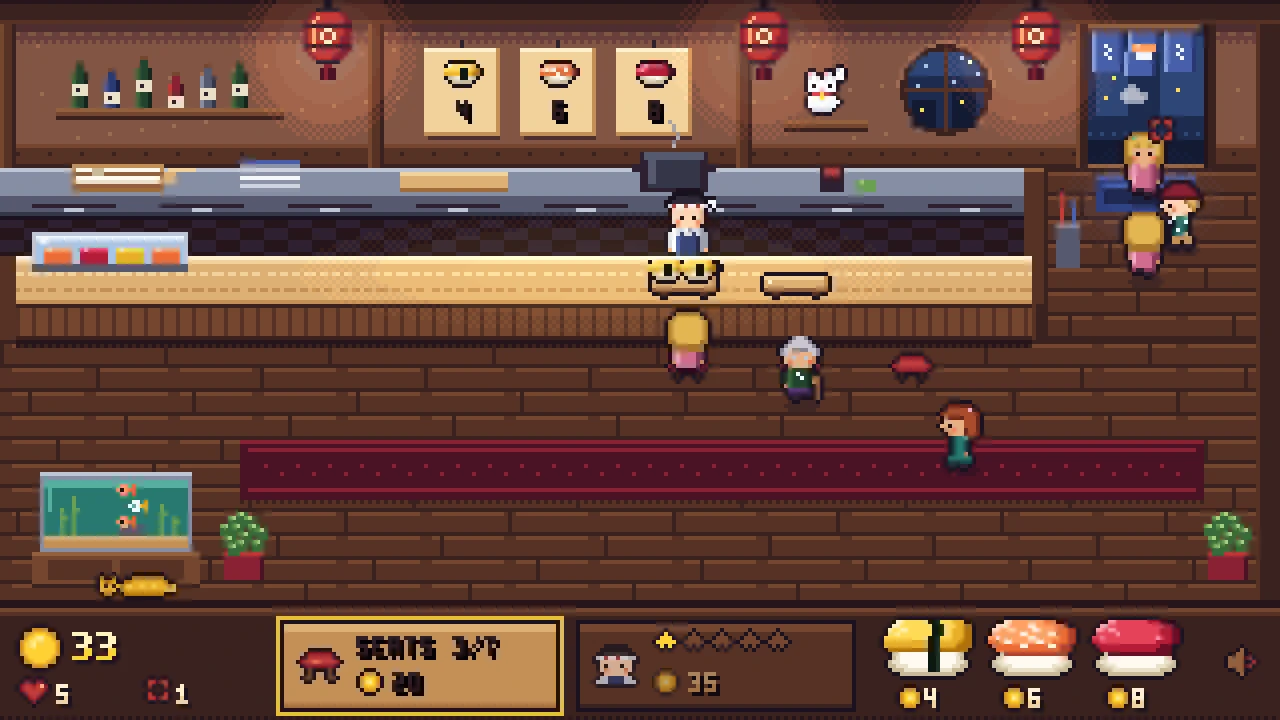
And when patience runs out, they storm off with steam puffs and pay nothing:
5. A loop you can measure
The shop rules run in plain TypeScript with no graphics, so Claude could play 10 minutes of the game in a second, five times with different seeds. It ran it twice: once without buying anything, and once buying the cheapest upgrade whenever it could.
| No purchases | Buys upgrades | |
|---|---|---|
| Customers served | 97 | 160 |
| Left angry | 14 | 2 |
| Average wait for food | 7.0 s | 8.6 s |
| Coins per minute | 68 | 107 |
The first upgrade is affordable after about 32 seconds. Idle game designers aim for a first purchase within a minute (dev.to). In a stress test with very impatient customers, 265 walked out and 81 dishes were wasted, and no customer ever got stuck.
What it cost
One prompt, no follow-ups: 25 minutes and $5.39 of Claude Code working alone, in an empty folder with only the skill.
What it didn't do: on a phone held upright the game is small (it asks you to turn the phone), the chef doesn't clear plates (they disappear), and groups don't arrive together yet.
Next: card packs
Right now there are three fixed dishes. In part 2 the ingredients come from card packs with six rarity tiers, from a plain Common card to an Ultimate card with an aura and light rays, so opening one feels like an event.
Make your own
- Copy the skill below into
.claude/skills/shop-sim/in an empty folder, or download it with its references. - Ask your agent for your own shop: "Make a pixel-art ramen stand seen from above, where customers walk in, order, eat and pay."
- Check its report: the first purchase within a minute, nobody stuck, and screenshots it looked at.
The skill that made it work
This is the skill we gave Claude Code (the numbered rules below; the full version has three short reference files on art, people and feedback). Copy it, or download it with its references and the pixel.py sprite script.
- Stack. Vite + TypeScript + Phaser 3, built to static files that run from any folder (relative paths, `base: './'`). Keep the simulation in plain TypeScript modules with no Phaser imports (`src/sim/`), stepped at a fixed rate with a seeded random number generator, so it can run headless in Node for tests. Phaser only draws the state and sends player input in.
- One key image first. Before writing the loop, draw one mockup of the whole shop in code: floor, walls, counter, seats, the chef, three customers in different states, food on plates, the coin counter. Look at it at 1× and 2× and fix the direction until it looks like a game people would want to watch. Take the palette from it and draw everything else to match. See references/art.md.
- Pixel rules. One art pixel size everywhere, integer scaling only, `pixelArt: true`, no smoothing. A low internal resolution (about 320×180 or 384×216) scaled up by a whole number to fit the window. One palette of about 24–32 colours with hue-shifted ramps, one light direction (top-left), warm light inside, cool outside. Top-down 3/4 view: you see the tops of the counter and tables and the fronts of people.
- Tiny people with personality. Customers are about 12–16 art px tall, built from shared parts (head, hair, body, legs) so you get many variations from palette swaps and a few hair and accessory parts: a salaryman, a student with a backpack, a grandma, a tourist with a camera, a kid. A 2–4 frame walk, a sitting pose and an eating loop. Add life with sub-pixel animation (a blink, a breathing colour shift, chopsticks moving) instead of big motion. The chef has a distinct hat or headband and visible working animations. See references/people.md.
- Food that looks delicious. Food is the hero of a food game. Build each dish from layers (rice, then fish, then a glaze or garnish), give fish a 1–2 px specular highlight and a fatty shimmer, outline it so it reads as illustration and not a shrunken photo. Draw a large version (about 24–32 art px) for menus and pop-ups and a small one (6–10 art px) for plates in the scene. Every dish must be recognisable by colour and shape at small size.
- Readable without text. Every customer state has an icon or pose: arriving, waiting for a seat, ordering (a bubble with the dish icon), waiting (a patience ring that shrinks and changes colour), eating, happy (a heart or note), annoyed (a steam puff) and leaving. Money comes out of the customer as a coin that flies to the counter, with a floating +amount. No status text in the scene. See references/feedback.md.
- A complete loop. Customers arrive on a timer, pick a free seat or queue at the door, order from the menu, the chef makes the dish (visible progress), it is served, they eat, pay and leave. If patience runs out they leave without paying and the dish is wasted. Seats, chef speed and the menu are data, so later systems can change them. Give the player at least one thing to spend coins on from the start (for example another seat, or a faster chef), with the first purchase possible within about a minute.
- The page around the game. The canvas fills its container and keeps its aspect ratio with integer scaling, letterboxed in a colour that matches the scene, so it works inside a 720 px wide blog post and on a phone. UI (coins, buttons) is drawn in the same pixel style and is large enough to tap. Sound is off until the player clicks. Never show a loading screen longer than a second.
- Measure it. Write `npm run sim`: run the simulation headless for 10 simulated minutes with fixed seeds and report customers arrived, served, left angry, average wait, coins per minute, time to the first affordable purchase, and that no customer is ever stuck (every customer reaches the exit). Take screenshots in a real browser at 720 px wide and at phone width, look at them, and fix what doesn't read. Keep it running at 60 fps with the shop full.
- Report. Say what the art direction and palette are, what the loop does, the measurements, and what is not done yet.
Save it as .claude/skills/shop-sim/SKILL.md in your project. Put the references folder and scripts folder next to it.